Blog do projektu Open Source JavaHotel

niedziela, 25 marca 2012

Simple calendar

I extracted simple "calendar" component from JavaHotel application. It is nothing more than several controls allowing user to navigate through period of time. It does not make a lot of sense to run it as a stand-alone but can be used as a part of larger application.

Demo version is available (click on ScrollControll).
http://javahoteltest.appspot.com/

The source code for this demo :

  private class DrawClass implements IDrawPartSeason {

        @Override
        public void setW(IGWidget w) {
            hP.add(w.getGWidget());
            hP.add(vP);
            vP.setBorderWidth(1);
            vP.setSpacing(15);
        }

        @Override
        public void refresh(IDrawPartSeasonContext sData) {
            int no = sData.getLastD() - sData.getFirstD() + 1;
            if (vP.getWidgetCount() != no) {
                vP.clear();
                for (int i = 0; i < no; i++) {
                    vP.add(new Label(""));
                }
            }
            for (int i = 0; i < no; i++) {
                Date d = sData.getD(sData.getFirstD() + i);
                String s = DateFormatUtil.toS(d);
                Label l = (Label) vP.getWidget(i);
                l.setText(s);
            }

        }

    }
Callback function should implement two methods. The first (launched only once at the beginning) delivers widget containing the controls which should be placed somewhere in the display.
The second responds to the user movement through the period of time. In this example simply refresh the cells.
The source code : interfaces and implementation.

piątek, 10 lutego 2012

So wise so young

http://shakespeare.mit.edu/richardiii/full.html

GLOUCESTER
[Aside] So wise so young, they say, do never live long.

niedziela, 5 lutego 2012

My next Eclipse plugin, DB2 and PL/SQL

Introduction
I created my next Eclipse plugin. Full source code is available here. This time a little bit more complicated one. It allows extracting and working with PL/SQL packages (specification and body) and deploy them again. It is not a mistake - PL/SQL (SQL Oracle dialect) packages can be created and run against DB2 by virtue of Oracle Compatible Mode in DB2.
Of course - it is rather a lightweight version.
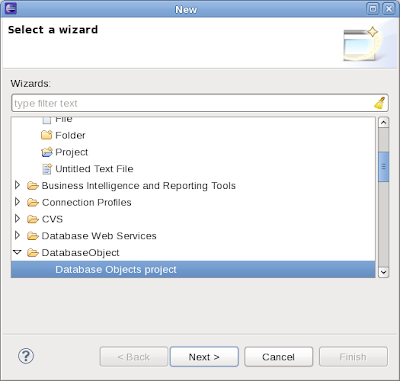
My purpose was also to practice some additional features of Eclipse plugin I have not used so far: project nature, new project wizard,  project properties, and integration with Data Tools Platform component.
Project nature
Eclipse project nature  does not mean anything special. It allows to distinguish one project from another and to define some actions or properties specific to some project. For instance : "Extract PL/SQL objects" actions (look below) makes sense for a project with nature "Database Object" only but does not make any sense for any other project.
Defining project nature is very simple. Just add an entry in plugin.xml file.

<extension
         id="databaseobject.category.projectNatureId"
         point="org.eclipse.core.resources.natures">
      <runtime>
         <run
               class="databaseobject.nature.ProjectNature">
         </run>
      </runtime>
</extension>

and supporting class (with empty content in this case).
New project wizard
Having project nature defined I created New Wizard Project action. It creates Database Objects project and applied project nature to it.

 <extension
         id="databaseobject.category.wizards"
         name="Custom Wizard"
         point="org.eclipse.ui.newWizards">
         <category
            id="databaseobject.category.wizards"
            name="DatabaseObject">
      </category>
        <wizard
            category="databaseobject.category.wizards"
            class="databaseobject.wizards.NewProjectWizard"
            id="databseobject.wizard.new.custom"
            name="Database Objects project">
      </wizard>
      </extension>

Wizard class - available here.


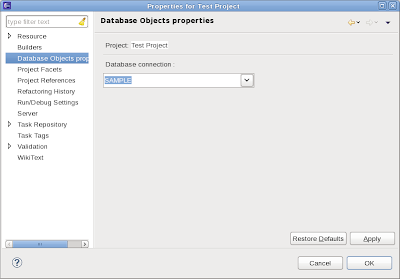
Project properties
Next step is to add some specific properties to the project (identified by project nature).

<extension
      point="org.eclipse.ui.propertyPages">
   <page
         class="databaseobject.properties.DatabaseObjectPropertyPage"
         id="databaseobject.properties.DatabaseObjectPropertyPage"
         name="Database Objects properties">
  <filter name="nature"
     value="databaseobject.category.projectNatureId"/>
   </page>
</extension>
By means of project nature this property will be visible only for this type of project and absent in all other projects.
Supporting class is  defined here. This property is very simple and allows assign DB2 database connection (look above) to the project.


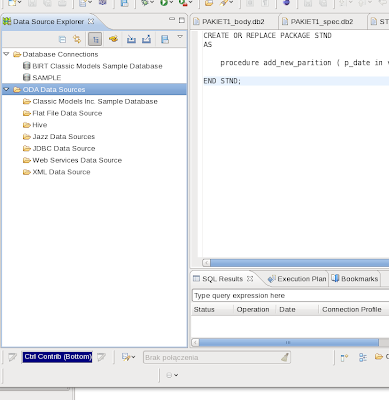
Integration with Eclipse Data Tools Platform
Every Java developer knows very well how to set up JDBC connection to any database (jar files, driver, URL etc). But Eclipse plugin developer does not need reinvent this wheel again, it is done already. The only effort is to make usage of goodies provided by Data Tools Platform.


Unfortunately - integration with Data Tools Platform is not easy task and requires tedious browsing through doc and sample.  But after being connected we can run SQL statements by using standard JDBC methods and tools.
Several useful pieces of code can be found here.
Extract existing PL/SQL packages from DB2 database
First step to work with PL/SQL packages is to extract them from DB2 database into our Database Object project.
Enumerating and retrieving PL/SQL packages is performed by several DB2 specific SQL statements.
Source code

     /** Statement enumerating all PL/SQL packages. */
        private static final String SELECTPACKAGESTATEMEN = "SELECT MODULESCHEMA, MODULENAME FROM SYSCAT.MODULES WHERE MODULETYPE = 'P' ORDER BY MODULESCHEMA"; //$NON-NLS-1$
        /** Statement retrieving package specification. */
        private static final String SELECTPACKAGESPEC = "SELECT TEXT FROM DBA_SOURCE WHERE SCHEMA = ? AND TYPE = 'PACKAGE' AND NAME = ?"; //$NON-NLS-1$
        /** Statement retrieving package body. */
        private static final String SELECTPACKAGEBODY = "SELECT TEXT FROM DBA_SOURCE WHERE SCHEMA = ? AND TYPE = 'PACKAGE BODY' AND NAME = ?"; //$NON-NLS-1$
To display and select which packages are to be extracted I reused Feature Tree created in my previous Eclipse project.


After double clicking on any PL/SQL package name the content of this package is displayed.


Project with some PL/SQL packages extracted
After extracting required packages our project contains package specification and body as a plain text file and by using Eclipse text editor it is possible to modify and develop them.


Deploying PL/SQL packages into DB2 database
Of course - also opposite operation is possible. After modifying package content we can put it again into DB2.


Deploying package into DB2 is done by standard JDBC Statement.execute method. Source code :


// get jdbc connection
                        Connection jdbc = PluginUtil.getConnection(iP);
                        // read and prepare script as string
                        String fileName = PluginUtil.getFileName(sel);
                        FileReader r = new FileReader(new File(fileName));
                        String sql = "";
                        int ch;
                        while ((ch = r.read()) != -1) {
                                sql += (char) ch;
                        }

                        // run sql statement (deploy PL/SQL package here)
                        Statement stmt = jdbc.createStatement();
                        stmt.execute(sql);
Nothing specific is necessary to accomplish it.
Conclusion, future.
Of course, this plugin is rather a skeleton and is unlikely to be used in any production environment. But can be used as a starting point for future development.

  • Add "New package" action. Creates empty package specification and body
  • Deploy action also available from editor
  • Deploy group of packages at the same time
  • "Run" action. Allows defining and executing SQL statement which calls some package method for testing purpose.
  • Better integration with Data Tools Platform, use SQL editor available there. Unfortunately Data Tools Platform package is not enabled for PL/SQL packages in DB2 and it is not possible to deploy them.
  • Make usage of "SQL Results" view provided with Data Tools Platform for keeping tracks of all database activities (extracting and deploying).
IBM Data Studio
One can ask if it makes any sense to develop this skeleton if IBM Data Sudio is available for free and contains all that functionality and much more. IBM Data Studio is a very good choice but I found some problems there.
  • It is not possible to deploy package specification only (without package body).
  • Package content is persisted as XML document and there is no easy method to extract it into plain text file (only by copy and paste).
  • Because of that also Eclipse "Compare" text does not work as expected (compares XML files).
But on the other hand IBM Data Studio is still evolving tool (version 3.1 was released on November 2011) and may be the next version will contain a solution to the problems described above.

poniedziałek, 26 grudnia 2011

XML or not XML

Problem
For some time I have been working on adding invoice making to javahotel application. I had to resolve a problem how to keep invoice data in the database. One invoice contains a lot of data of different data types and it is possible to design a table with a set of columns reflecting invoice data.
But I found the following problems:
  1. There are a lot of different invoice types and every invoice type contains a set of data common to all invoices and some data specific to the invoice type given. So I have to design a different relational table for every invoice type or one common table containing the superset of all possible data. The second approach means that probably a lot of columns would be empty for  a particular invoice.
  2. Invoice contains also a list of invoice details (different  for every invoice). So I have to design the second table with invoices details ("details" could be different for every invoice type) and connect them by one-to-many relation.
  3. I cannot predict at this moment  all possible invoice types. Probably in the future it will be necessary to add new data to the invoice or redesign existing. But modifying relational data in a production environment is a complicated task and should be avoided as much as possible.
Solution idea
The solution is to keep invoice data as XML string in relational table. But XML format is convenient at server-side and less convenient at client-side. Although GWT provides tools for handling XML types (link) it requires some additional effort and not reads well. Designing a POJO class for keeping invoice data and deserialize XML into POJO object is having the same disadvantages as described above.
But I found that very flexible and useful entity for keeping data is simple Map class. Instead of :
 POJO container;
 Object val =  container.getInvoiceDate();
just use:
Map container;
Object val = container("InvoiceData");
Map does not require redesigning if invoice structure changes and could be the same for any invoice type.
So the solution is to keep invoice data as XML string in the database and transform it to the Map class before transporting to client side and opposite.
Solution
So I created a general solution for transforming XML to Map (and opposite) at server side and use Map as a transient object. Client is receiving and using Map and is sending Map back to the server. General sequence of actions is as follows.
  1. Client request
  2. Server retrieves XML string from database and transforms to Map
  3. Map is sent back to client
  4. Client sends Map to server
  5. Server transforms Map to XML and XML string is stored in the database.
Common data structure
This package is common for client and server.

It is an interface (Map) for keeping data. Should be extended for concrete implementation.  It is a subset of Map interface. Keys are XPath selector for the node containing data.

package com.gwtmodel.table.mapxml;

import java.util.Set;

/**
 * @author hotel
 *
 */
public interface IDataContainer {
   
    public Set getKeys();

    public Object get(Object key);

    public Object put(String key, Object val);

}
It is an abstract template class for the whole data (invoice). It contains main body (as IDataContainer) and list of invoice details (as list of IDataContainer). This class should extended for concrete implementation.
package com.gwtmodel.table.mapxml;

import java.io.Serializable;
import java.util.List;

/**
 * @author hotel Template class for keeping IDataContainer data.
 */
@SuppressWarnings("serial")
abstract public class DataMapList implements
        Serializable {

    /** Main body of data. */
    private T dFields;
    /** List of lines in shape of IDataContainer. */
    private List dLines;

    public DataMapList(T dFields, List dLines) {
        this.dFields = dFields;
        this.dLines = dLines;
    }

    /**
     * @return the dFields
     */
    public T getdFields() {
        return dFields;
    }

    /**
     * @return the dLines
     */
    public List getdLines() {
        return dLines;
    }

    /**
     * Adds next line to the dLines and returns IDataContainer just added
     * 
     * @return IDataContainer added
     */
    abstract public T addToLines();
}

It is limited to one list of data but can be easily extended.
Solution for server-side
The package is available here.
The solution requires to define pattern XML. An example is available here. Pattern is an XML file with empty content (only tag structure is defined) and type attribute which describes the content of the tag. Interpreting types and transforming between Map object and XML texts is done by IXMLTypeFactory interface (look below).
So creating XML string from IDataContainer map is done by means of filling the pattern XML with text content. Map keys are XPath pointers for XML document.
And opposite - deserialize XML string into IDataContainer is done by scanning XML file, taking 'type' info from pattern XML and filling the IDataContainer with key values.
For concrete implementation it is necessary to customize IXMLTypeFactory interface.

package com.gwtmodel.mapxml;

/**
 * @author hotel Factory interface providing user specific data
 */
public interface IXMLTypeFactory {

    /** Common types. */
    String DATE = "date";
    String DECIMAL = "decimal";
    String INT = "int";
    String INTEGER = "integer";
    String LONG = "long";

    /** Name of type attribute. */
    String TYPE = "type";

    /** Returns name of 'lines' element. */
    String getLinesTag();

    /** Returns name of single line in 'lines' section. */
    String getLineTag();

    /**
     * Creates object from string (element text). Object will be inserted into
     * IDataContainer map.
     * 
     * @param xType
     *            Type string (or null). Values is taken from 'type' attribute
     * @param s
     *            String value
     * @return Object
     */
    Object contruct(String xType, String s);

    /**
     * Opposite to construct. Transforms object to string
     * 
     * @param xType
     *            Type string (or null).
     * @param o
     *            Object taken from IDataContainer map
     * @return String to be inserted into XML string
     */
    String toS(String xType, Object o);
}

There is also available default implementation of this interface. It can be used "as is" or extended if customization is necessary.
package com.gwtmodel.mapxml;

import java.math.BigDecimal;
import java.text.ParseException;
import java.text.SimpleDateFormat;
import java.util.Date;

import com.gwtmodel.table.common.CUtil;
import com.javahotel.common.command.PaymentMethod;

/**
 * @author hotel Default implementation of IXMLType Factory. Can be used 'as is'
 *         or extended
 */
public class SimpleXMLTypeFactory implements IXMLTypeFactory {

    protected final SimpleDateFormat fo = new SimpleDateFormat("yyyy-MM-dd");

    public final static String PAYMENT = "pay";

    protected boolean isInt(String xType) {
        return xType.equals(INT) || xType.equals(INTEGER);
    }

    @Override
    public Object contruct(String xType, String s) {
        if (CUtil.EmptyS(xType)) {
            return s;
        }
        if (xType.equals(PAYMENT)) {
            return PaymentMethod.valueOf(s);
        }
        if (xType.equals(DATE)) {
            try {
                return fo.parse(s);
            } catch (ParseException e) {
                e.printStackTrace();
                return null;
            }
        }
        if (xType.equals(DECIMAL)) {
            return new BigDecimal(s);
        }
        if (isInt(xType)) {
            return new Integer(s);
        }
        if (xType.equals(LONG)) {
            return new Long(s);
        }
        return s;
    }

    @Override
    public String toS(String xType, Object o) {
        if (CUtil.EmptyS(xType)) {
            return (String) o;
        }
        if (xType.equals(DATE)) {
            Date d = (Date) o;
            return fo.format(d);
        }
        if (xType.equals(PAYMENT)) {
            PaymentMethod pa = (PaymentMethod) o;
            return pa.toString();
        }
        if (xType.equals(DECIMAL)) {
            BigDecimal b = (BigDecimal) o;
            return b.toString();
        }
        if (xType.equals(LONG)) {
            Long l = (Long) o;
            return l.toString();
        }
        if (isInt(xType)) {
            Integer i = (Integer) o;
            return i.toString();
        }
        return (String) o;
    }

    @Override
    public String getLinesTag() {
        return "//Lines";
    }

    @Override
    public String getLineTag() {
        return "Line";
    }

}
Additional classes description

Example implementation

Implementation of IDataContainer.

Implementation of DataMapList.

Entity bean for keeping invoice data: link. Invoice data is stored as:
@Basic(optional = false)
private Text invoiceXML;
Transient object used at client side: link. All keys (XPath selector) are defined as constants

Source code for Map->XML transformation.


      sou.getInvoiceD().getdFields()
                .put(InvoiceP.INVOICENUMBER, sou.getName());
        String xml = HotelCreateXML.constructXMLFile(iC, IMess.INVOICEPATTERN,
                sou.getInvoiceD());
        boolean ok = false;
        if (xml != null && HotelVerifyXML.verify(iC, xml, IMess.INVOICEXSD)) {
            ok = true;
        }
        if (!ok) {
            iC.getLog().getL().info(xml);
            String mess = iC.logEvent(IMessId.INPROPERINVOICEXML,
                    dest.getName(), IMess.INVOICEXSD);
            throw new HotelException(mess);
        }
        dest.setInvoiceXML(xml);

Code for opposite XML->Map transformation.
        HotelChangeXMLToMap.constructMapFromXML(iC, dest.getInvoiceD(),
                sou.getInvoiceXML());
        String i = (String) dest.getInvoiceD().getdFields()
                .get(InvoiceP.INVOICENUMBER);

Additional information
There is also additional disadvantage for XML - searching and query running. Because it is not stored as a regular relational columns standard SQL statement cannot be used. So searching in XML requires additional effort - for instance in Google App Engine there is no standard method for scanning through XML. In order to find something one has to scan through table, retrieve XML string and by means of Java programming search through XML.
But there is good news for DB2 users. DB2  (available also for DB2-Express free edition) provides built-in engine (pureXML) for querying XML data without extracting them to the application.
For instance:
Finding all invoices greater then 10000$ can be as easy as running a query:

select * from invoice

where xmlexists('$c/Invoice/Total/Total > "10000"'

passing invoice.invoiceXML as "c")

wtorek, 6 grudnia 2011

Oracle, awk, tablespace

Problem
Assume we have the Oracle database schema export and want to deploy this schema to another database.
CREATE TABLE "SCOTT"."BONUS" 
( "ENAME" VARCHAR2(10), 
"JOB" VARCHAR2(9), 
"SAL" NUMBER, 
"COMM" NUMBER 
) PCTFREE 10 PCTUSED 40 INITRANS 1 MAXTRANS 255 NOCOMPRESS LOGGING 
STORAGE(INITIAL 65536 NEXT 1048576 MINEXTENTS 1 MAXEXTENTS 2147483645 
PCTINCREASE 0 FREELISTS 1 FREELIST GROUPS 1 BUFFER_POOL DEFAULT) 
TABLESPACE "T_SPACE1" 
Probably after deploying this table definition we receive the error message ORA-00959 (Table space T_SPACE1 does not exist).  Of course - no problem to create T_SPACE1 table space manually but what to do if we have thousands of tables with tens or even hundreds different table spaces ?
Solution
I found the following awk script useful. It simply extracts all table spaces names from table schema export and creates a script for creating all table spaces used. Datafile name is the same as table space name.
BEGIN {  }

/TABLESPACE/ {
   for (i=1; i < NF; i++) {
     if ($i == "TABLESPACE") {
       TSPACENAME=toupper($(i+1))
       gsub(",.*","",TSPACENAME);
       namespaces[TSPACENAME] = 1;
     }   
   }
}
END { 
  for (i in namespaces) {
    TSPACENAME=i;
    TFILENAME=tolower(TSPACENAME); gsub("\"","",TFILENAME); 
    TFILENAME = TFILENAME ".dbf";

    print "CREATE TABLESPACE " TSPACENAME
    print "DATAFILE '/home/oracle/app/oracle/oradata/test/" TFILENAME "'"
    print "size 1m autoextend on next 1m maxsize 2048m EXTENT MANAGEMENT LOCAL;"
    print
  }
}
You can catch the standard output and modify it before deployment - for instance remove creating TEMP and USERS table space. An example of usage:
awk -f namespace.awk < MY_USERS_TABLES.SQL >create_tablespace.sql
Additional remarks

  1. This script assumes that TABLESPACE clause and the following table space name is in the same line. It does not hold true every time. It is possible to extend this script but it requires more coding.
  2. The predicat i<NF (not i<=NF) is on purpose. Just skips if TABLESPACE clause is the last in the line. Probably it makes sense to add a warning message on that.
  3. The gsub(",.*","",TSPACENAME); regards the case when table space name is followed by , (coma). For instance  TABLESPACE "T_SPACE", PARTITION .. Unfortunately awk does not allow to specify more than one field deliminator, so coma is included as a part of table space name and should be removed after that.

poniedziałek, 28 listopada 2011

Logging and Eclipse plugin

I added logging to my first Eclipse plugin. It seems to have been much simpler than I previously thought. Just simple class like that is enough:

package com.db2.sb.scriptlauncher;

import org.eclipse.core.runtime.ILog;
import org.eclipse.core.runtime.Status;

import scriptlaucherdb2.Activator;

public class DB2LogUtil {

        private static ILog getLog() {
                ILog log = Activator.getDefault().getLog();
                return log;
        }

        private static void log(String msg, int id, Exception e) {
                getLog().log(new Status(Status.INFO, Activator.PLUGIN_ID, id, msg, null));
        }

        static void log(String msg) {
                log(msg, Status.OK, null);
        }

        static void log(String msg, Exception e) {
                log(msg, Status.ERROR, e);
        }

        static void logError(String msg) {
                log(msg, Status.ERROR, null);
        }

        static void launchererrorLog(Exception e) {
                log(Messages.DB2LauncherError, e);
        }

}

wtorek, 22 listopada 2011

Delphi, DB2, Oracle compatibility

Introduction
DB2 Compatibility Mode allows to use Oracle PL/SQL server code to run on DB2. Starting from version 9.7 DB2 recognizes two SQL dialects. SQL/PL - native DB2 and PL/SQL - native Oracle. SQL/PL code is compiled into DB2 binary form and run by DB2 engine directly - no emulation, no wrappers. It makes migration from Oracle to DB2 more easy. What's more - it is possible to maintain the same server code for two databases. It could be very interesting option for ISV.
Import : unfortunately Oracle compatibility mode is not available for DB2 Express version (free). But one can download and install 90-day trial version of full DB2 release.
Also application client code is Oracle compatibility enabled. For instance DB2 JDBC driver is also enhanced to give the developer the access to Oracle features, for instance SYS_REFCURSOR OUT parameter in PL/SQL stored procedure.
Unfortunately - Delphi is not on the IBM list of supported languages or application frameworks. But DBExpress DB2 client available with every edition of Delphi can also run application against DB2 enabled for Oracle, although not all features are supported.
What is under test
To prove it I created a simple server code and simple Delphi application. Server code and application code contains only some features related to Oracle.
  • Execute methods in Oracle style packages with IN and OUT parameters.
  • Execute Oracle PL/SQL stored procedure outside package.
  • Execute Oracle PL/SQL UDF
  • Query the table having Oracle NUMBER type (added with DB 9.7)
  • Query the table having DATE column (there is difference between DB2 and Oracle implementation)
  • Read cursor returned from stored procedure.
Delphi code is created and executed as DUNIT test.
The application and server code is available here.
The purpose is to pass all test using the same application and server code for both databases.
Server code and migration
It is very simple and contains three tables and several simple PL/SQL code objects : packages, UDF and stored procedures. The migration of the server code from Oracle to DB2 was very simple - just deploy all object to DB2 without changing single line. Only stored procedure returning SYS_REFCURSOR should have been modified because of limitation related to Delphi client (not server)
Application code and migration
Application code is divided into two parts. One class is a general purpose class used for encapsulating some methods giving access to the database server and the second is the DUNIT test code.
Migration of the application code was more complicated than the server code, more changes were necessary. But - to my thinking - after acquiring know-how and following good programming practices it is possible to migrate application from Delphi and maintain the same application code for both databases.
Connecting to database
It is pretty easy for DB2. Just install DB2 Server Client  and it is ready to use by Delphi application. Oracle is a little bit more complicated if one uses instant-client. After unpacking client bundle it is necessary to manually set ORACLE_HOME variable and %ORACLE_HOME%\network\admin\tnsnames.ora connection profile.
After that the connection code is simple and easy:

procedure DBTest.ConnectOracle;
begin
  With Conn do
  begin
    Conn.DriverName := 'Oracle';
    Params.Values['USER_NAME'] := 'testuser';
    Params.Values['PASSWORD'] := 'testuser';
    Params.Values['DATABASE'] := 'TEST';
  end;
end;

procedure DBTest.ConnectDB2;
begin
  With Conn do
  begin
    DriverName := 'DB2';
    VendorLib := 'db2cli.dll';
    LibraryName := 'dbxdb2.dll';
    GetDriverFunc := 'getSQLDriverDB2';
    Params.Values['USER_NAME'] := 'db2inst1';
    Params.Values['PASSWORD'] := 'db2inst1';
    Params.Values['DATABASE'] := 'tsample';
  end;
end;

Calling stored procedure
For some reason to run stored procedure on Oracle requires ParamCheck attribute set as true and while running on DB2 it should be set as false. The solution is to create construct method for creating TSqlStoredProc class which has this attribute set accordingly and reuse this method accross application.

function DBTest.getSP(packName: String; procName: String): TSQLStoredProc;
var
  SP: TSQLStoredProc;
begin
  SP := TSQLStoredProc.Create(Nil);
  with SP do
  begin
    SQLConnection := Conn;
    SchemaName := '';
    PackageName := packName;
    StoredProcName := procName;
    case T of
      Occcracle:
        ParamCheck := true;
      DB2:
        ParamCheck := false;
    end;
    Params.Clear;s
  end;ddd
  result := SP;
end;
Keeping this limitation in mind there is  no problem with running PL/SQL stored procedure on DB2 database the same way as on Oracle. IN/OUT parameters are working as expected. Also stored PL/SQL procedure outside package can be called by omitting PackagName atrribute.
Example
procedure DBTest.addMessageToPackageLog(mess: String);
var
  SP: TSQLStoredProc;
begin
  SP := getSP('A_TESTLOG', 'ADD_MESSAGE');
  With SP do
  begin
    Params.CreateParam(TFieldType.ftString, 'MESS', TParamType.ptInput);
    ParamByName('MESS').AsString := mess;
    ExecProc;
  end;

PL/SQL UDF function
Any PL/SQL UDF function can be used as a part of SQL statement in DB2 also.
UDF Example
CREATE OR REPLACE FUNCTION ORACLE_FUNC 
RETURN INTEGER
AS
VARCOUNT INTEGER := 123;
BEGIN
    RETURN VARCOUNT;
END;

Statement
procedure TestDBTest.Testfunc;
var   Q: TSQLQuery;
  res : integer;
begin
  FDBTest.connect;
  { important to add ORACLE_FUNC alias, DB2 returns column number }
  Q := FDBTest.getQ('SELECT ORACLE_FUNC AS ORACLE_FUNC FROM DUAL');
  with Q do begin
    Open;
    res := FieldByName('ORACLE_FUNC').AsInteger;
    CheckEquals(123,res);
  end;

  FDBTest.disconnect;
end;

One has to remember that column name in this type of  a statement is different in DB2 and Oracle. So to keep the same statement text for both platforms it is necessary to use alias for column name.

NUMBER data type
To use NUMBER data type in DB2 DBExpress client it is necessary to update db2ini.cli file and set MapDecimalFloatDescribe parameter.
Example:
[TSAMPLE]
MapDecimalFloatDescribe = 3
DBALIAS=TSAMPLE
PWD=db2inst1
UID=db2inst1
It will map DECFLOAT datatype (NUMBER) to float data type in Delphi. One has to remember about the risk related to the loss of precision.
For some reason DBExpress requires for NUMBER stored procedure parameter ftBCD for Oracle and ftFloat for DB2. It can be resolved by introducing a function:

function DBTest.getBCDType : TFieldType;
begin
  case T of
  Oracle : result := ftBCD;
  DB2: result := ftFloat;
  end;
end;
After that call sequence can look like:
function DBTest.getNumberOfMessage: integer;
var
  SP: TSQLStoredProc;
begin
  SP := getSP('A_TESTLOG', 'GET_NUM');
  With SP do
  begin
    Params.CreateParam(getBCDType, 'NUM', TParamType.ptOutput);
    ExecProc;
    result := ParamByName('NUM').AsInteger;
  end;
end;
NUMBER datatype in different forms (NUMBER, NUMBER(10), NUMBER(14,4)) works as expected.
DATE data type
DATE data type behaves differently in DB2 and Oracle. In DB2 it keeps year, month and day, in Oracle also hours, minute and millisecond. But in Oracle Compatibility Mode the DATE behaves the same way as in Oracle.
ftCursor
The stored procedure:
CREATE OR REPLACE PROCEDURE PROC_CURSOR (VARRESULT OUT SYS_REFCURSOR)
AS
STMT VARCHAR2(2000);
BEGIN
  A_TESTNUM.PREPARE_DATA; 
  OPEN VARRESULT FOR SELECT * FROM TABLE_NUM;
END;
This stored procedure can be deployed and used in DB2 without any problems. But DBExpress DB2 client does not support ftCursor output parameter although it supports returning cursor from native SQL/PL stored procedure. Unfortunately, there is no way to transform PL/SQL cursor to returning cursor in DB2 SQL/PL- even by means of C++/Java/SQL stored procedure just to keep original PL/SQL procedure untouched.
In order to avoid code duplicating (two versions of the cursor stored procedure) small refactoring is necessary in the server and client code to minimize code branching.
Server code:
CREATE OR REPLACE PROCEDURE PROC_CURSOR (VARRESULT OUT SYS_REFCURSOR)
AS
STMT VARCHAR2(2000);
BEGIN
  PREPARE_PROC_CURSOR(STMT);
  OPEN VARRESULT FOR STMT;
END;
@

CREATE OR REPLACE PROCEDURE PREPARE_PROC_CURSOR (STMT OUT VARCHAR) AS
BEGIN
  A_TESTNUM.PREPARE_DATA; 
  STMT :=  'SELECT * FROM TABLE_NUM';
END; 
@

CREATE OR REPLACE PROCEDURE INSERT_NUMS(NUM1 IN A_TESTNUM.N1%TYPE, NUM2 IN A_TESTNUM.N2%TYPE,NUM3 IN A_TESTNUM.N3%TYPE) AS
  BEGIN
    A_TESTNUM.PA_INSERT_NUMS(NUM1,NUM2,NUM3); 
  END INSERT_NUMS;
@

CREATE PROCEDURE DB2_PROC_CURSOR ()
        DYNAMIC RESULT SETS 1
P1: BEGIN
        -- Declare cursor
        DECLARE STMTA VARCHAR2(2000);
        BEGIN
            CALL PREPARE_PROC_CURSOR(STMTA);
        PREPARE STMT_P FROM STMTA;
    END;        
    BEGIN
          DECLARE cursor1 CURSOR WITH RETURN for STMT_P;
          OPEN cursor1;
        END;
END P1

Assuming that the most important logic is hidden in preparing statement text this part of the code can be reused. Only small part responsible for creating a cursor is database dependent. But this parts are pure mechanical ones and there is nothing special there.
Also calling sequence at the application side should be modified.

function TestDBTest.getCursorSP: TSQLStoredProc;
var
  SP: TSQLStoredProc;
begin
  case FDBTest.getT of
    Oracle:
      begin
        SP := FDBTest.getSP('PROC_CURSOR');
        SP.Params.CreateParam(TFieldType.ftCursor, 'VARRESULT',
          TParamType.ptOutput);
      end;
    db2:
      SP := FDBTest.getSP('DB2_PROC_CURSOR');
  end;
  result := SP;
end;
It is bad news. But good news is that the rest of the code (Open, Next, Eof) is exactly the same for both platforms.
Devart DBExpress
Devart DBExpress client for Oracle client (purchasable) covers much more functionality than the standard DBExpress client delivered with Delphi. For instance BOOLEAN datatype parameters in stored procedure are supported. Also it is possible to call UDF directly (not as a part of SELECT statement) and retrieve the result. This functionality is not supported by DB2 DBExpress client.  Migrating application heavily dependent on this additional functionality requires much more effort.
Conclusion
Although one cannot say that migrating Delphi application from Oracle to DB2 is a piece of cake it is astonishing that so much can be achieved even the if DBExpress client for DB2 is not Oracle Compatibility Mode enabled. What is more important - ISV can maintain the same code for both platforms just to cover both market shares.
The Grande Finale
DB2 and Oracle