It is very convenient to run IBM Streams in Docker container to avoid huge VM overhead. There is one project available, but my plan is not so ambitious.
The solution is described here, Dockerfile file is also available there. It is not full automation, it is rather several pieces of advice how to set up Docker container with running IBM Streams domain and instance inside, just lightweight Virtual Machine easy to set up and calm down.
But it comes with one serious limitation. Only single host standalone installation is possible. Multihost installation requires resolving IP-DNS mapping and I failed to overcome this problem.
But standalone installation is enough for developing, testing and evaluation. I will keep going to support multihost also.
Pokazywanie postów oznaczonych etykietą Streams. Pokaż wszystkie posty
Pokazywanie postów oznaczonych etykietą Streams. Pokaż wszystkie posty
sobota, 22 lipca 2017

czwartek, 29 grudnia 2016
IBM InfoSphere Streams, BigSql and HBase
Introduction
Some time ago I created Java methods to load data into HBase using format understandable by BigSql. Now it is high time to move ahead and to create IBM InfoSphere operator making usage of this solution.
The Streams solution is available here. The short description is added here.
JConvert operator
JConvert operator does not load data into HBase, it should precede HBASEPut operator.
JConvert accepts one or more input streams and every input stream should have corresponding output stream. It simply encodes every attribute in the input stream to blob (binary) attribute in the output stream. The binary value is later loaded to HBase table by HBasePut operator.
Very important factor is to coordinate JConvert input stream with target HBase/BigSql table. Neither JConvert nor HBasePut can do that, if attributes and column types do not match then BigSql will not read the table properly. Conversion rules are explained here.
TestHBaseN
This operator is used for testing, it also contains a lot of usage examples.
Simple BigSql/HBase loading scenario.

On the left there is the producer, then JConvert translates all input attributes into binary format and HBasePut operator load binaries to HBase table.
More details about TestHBaseN.
Some time ago I created Java methods to load data into HBase using format understandable by BigSql. Now it is high time to move ahead and to create IBM InfoSphere operator making usage of this solution.
The Streams solution is available here. The short description is added here.
JConvert operator
JConvert operator does not load data into HBase, it should precede HBASEPut operator.
JConvert accepts one or more input streams and every input stream should have corresponding output stream. It simply encodes every attribute in the input stream to blob (binary) attribute in the output stream. The binary value is later loaded to HBase table by HBasePut operator.
Very important factor is to coordinate JConvert input stream with target HBase/BigSql table. Neither JConvert nor HBasePut can do that, if attributes and column types do not match then BigSql will not read the table properly. Conversion rules are explained here.
TestHBaseN
This operator is used for testing, it also contains a lot of usage examples.
Simple BigSql/HBase loading scenario.

On the left there is the producer, then JConvert translates all input attributes into binary format and HBasePut operator load binaries to HBase table.
More details about TestHBaseN.
czwartek, 29 września 2016
IBM InfoSphere Streams, Big SQL and HBase
Introduction
Big SQL can run over HBase. IBM InfoSphere Streams does not have any mean to load data directly to Big SQL. Although it is possible to use general-purpose Database Toolkit (DB2), running INSERT statement for bulk data loading is very inefficient.
Another idea is to define Big SQL table as HBase table (CREATE HBASE TABLE) and load data directly to underlying HBase table. But HBase, unlike Hive, is a schemaless database, everything is stored as a sequence of bytes. So the content of HBase table should be stored using format supported by Big SQL.
IBM InfoSphere Streams provides HBase toolkit, but HBasePut operator cannot be used directly. For instance, string value stored by HBasePut operator is not valid CHAR column in terms of Big SQL, it should be pre-formated beforehand to binary format.
The solution is to develop additional Streams operator to encode all SPL types to binary (blob) format and such binary stream to be consumed by HBasePut operator.
Instead of (example):
HBaseEncode operator is to be implemented as Java operator. Before developing it I decided to create a simple Java project encoding a subset of Java types to the binary format accepted by Big SQL.
The Big SQL HBase data format is described here,so it looked as a simple coding task. But unfortunately, the description is not accurate, so I was bogged down by unexpected problems. For instance: NULL value is marked by 0x01 value, not 0x00. Also, the source code for Hive SerDe is not very useful, because Big SQL encoding diverges in many points.
So I ended up with loading data through Big SQL INSERT command and analyzing a binary content of underlying HBase table trying to guess the proper binary format.
Java project
The Java project is available here. It consists of several subprojects.
HBaseBigSql (Javadoc) will be used by Streams operator directly. It does not have any dependency. Big SQL types supported are specified by enum BIGSQLTYPE. The most important class is ToBIGSQL.java class containing the result of painstaking process revealing HBase binary format for all Big SQL types.
HBasePutGet (Javadoc) subproject contains several supporting classes to put data into HBase table. It has HBase client dependency.
TestH is Junit tests. The test case was very simple. CREATE HBASE TABLE, load data to underlying HBase table and get data through Big SQL SELECT statement and compare the result, whether data stored in HBase equals to data retrieved by Big SQL.
Possible extensions
Big SQL can run over HBase. IBM InfoSphere Streams does not have any mean to load data directly to Big SQL. Although it is possible to use general-purpose Database Toolkit (DB2), running INSERT statement for bulk data loading is very inefficient.
Another idea is to define Big SQL table as HBase table (CREATE HBASE TABLE) and load data directly to underlying HBase table. But HBase, unlike Hive, is a schemaless database, everything is stored as a sequence of bytes. So the content of HBase table should be stored using format supported by Big SQL.
IBM InfoSphere Streams provides HBase toolkit, but HBasePut operator cannot be used directly. For instance, string value stored by HBasePut operator is not valid CHAR column in terms of Big SQL, it should be pre-formated beforehand to binary format.
The solution is to develop additional Streams operator to encode all SPL types to binary (blob) format and such binary stream to be consumed by HBasePut operator.
Instead of (example):
stream<rstring key, tuple<rstring title, rstring author_fname,
   rstring author_lname, rstring year, rstring rating> bookData> toHBASE =
   Functor(bookStream)
  {
   output
    toHBASE : key = title + ":" + year, bookData = bookStream ;
  }

  // Now put it into HBASE.  We don't specify a columnQualifier and the attribute
  // given by valueAttrName is a tuple, so it treats the attribute names in that
  // tuple as columnQualifiers, and the attribute values
  () as putsink = HBASEPut(toHBASE)
  {
   param
    rowAttrName : "key" ;
    tableName : "streamsSample_books" ;
    staticColumnFamily : "all" ;
    valueAttrName : "bookData" ;
  }
usestream<rstring key, tuple<rstring title, rstring author_fname,
rstring author_lname, rstring year, rstring rating> bookData> toEncode =
Functor(bookStream)
{
output
toHBASE : key = title + ":" + year, bookData = bookStream ;
}
stream<blob key, tuple<blob title, blob author_fname, blob author_lname, blob year, blob rating> bookData> toHBase
HBaseEncode(toEncode)
{
}
// Now put it into HBASE. We don't specify a columnQualifier and the attribute
// given by valueAttrName is a tuple, so it treats the attribute names in that
// tuple as columnQualifiers, and the attribute values
() as putsink = HBASEPut(toHBASE)
{
param
rowAttrName : "key" ;
tableName : "streamsSample_books" ;
staticColumnFamily : "all" ;
valueAttrName : "bookData" ;
}
SolutionHBaseEncode operator is to be implemented as Java operator. Before developing it I decided to create a simple Java project encoding a subset of Java types to the binary format accepted by Big SQL.
The Big SQL HBase data format is described here,so it looked as a simple coding task. But unfortunately, the description is not accurate, so I was bogged down by unexpected problems. For instance: NULL value is marked by 0x01 value, not 0x00. Also, the source code for Hive SerDe is not very useful, because Big SQL encoding diverges in many points.
So I ended up with loading data through Big SQL INSERT command and analyzing a binary content of underlying HBase table trying to guess the proper binary format.
Java project
The Java project is available here. It consists of several subprojects.
HBaseBigSql (Javadoc) will be used by Streams operator directly. It does not have any dependency. Big SQL types supported are specified by enum BIGSQLTYPE. The most important class is ToBIGSQL.java class containing the result of painstaking process revealing HBase binary format for all Big SQL types.
HBasePutGet (Javadoc) subproject contains several supporting classes to put data into HBase table. It has HBase client dependency.
TestH is Junit tests. The test case was very simple. CREATE HBASE TABLE, load data to underlying HBase table and get data through Big SQL SELECT statement and compare the result, whether data stored in HBase equals to data retrieved by Big SQL.
Possible extensions
- The solution only writes data to HBase in Big SQL format. Opposite is to code a methods to read data from HBase table.
- Compound indexes and columns are not supported.
Next step
Develop IBM InfoSphere Streams HBaseEncode operator.
niedziela, 3 stycznia 2016
IBM InfoSphere Streams, PowerBI operator
Introduction
Previously I created a simple Java helper package to get access to PowerBI REST API. Now the time has come to develop Streams operator shipping data out to PowerBI. Full source code is available here as StreamsStudio project.
Operator description, parameters
Operator (Java source code is available here) accepts seven parameters, five mandatory and two optional.
Usage example
Loading modes
Three loading modes are supported. It is specified by parameter flushsize, described above.
Previously I created a simple Java helper package to get access to PowerBI REST API. Now the time has come to develop Streams operator shipping data out to PowerBI. Full source code is available here as StreamsStudio project.
Operator description, parameters
Operator (Java source code is available here) accepts seven parameters, five mandatory and two optional.
- oauth_username
- oauth_password
- oauth_clientid: Parameters are required to receive access token to PowerBI. More details about PowerBI REST API and authentication is available here.
- datasetName
- tablename: Defines the table in PowerBI namespace.
- flushsize: optional (default 1). Specifies the buffer size threshold before pushing data to PowerBI. Increasing the value improves performance but there is a delay between data is received and stored to PowerBI. The default is 1, every tuple is sent immediately to PowerBI. Value 0 has special meaning. Data is pushed to PowerBI when punctuation marker is received.
- cleanfirstly: optional (default false). A logical parameter, if true then PowerBI table is truncated at the beginning.
Operator description, data loading
Pushing data is very simple, just create input streams reflecting the table structure in PowerBI and let the tuples flow. Only primitive data types are allowed (source).
private Map createTableSchema(OperatorContext context) throws PowerException {
  StreamSchema sche = context.getStreamingInputs().get(0).getStreamSchema();
  Map bischema = new HashMap();
  for (String name : sche.getAttributeNames()) {
   Type.MetaType ty = sche.getAttribute(name).getType().getMetaType();
   String biType = null;
   switch (ty) {
   case RSTRING:
   case USTRING:
   case ENUM:
    biType = PowerBI.STRING_TYPE;
    break;
   case INT8:
   case INT32:
   case INT64:
   case UINT8:
   case UINT16:
   case UINT32:
   case UINT64:
   case INT16:
    biType = PowerBI.INT64_TYPE;
    break;
   case DECIMAL128:
   case DECIMAL32:
   case DECIMAL64:
   case FLOAT32:
   case FLOAT64:
    biType = PowerBI.DOUBLE_TYPE;
    break;
   case BOOLEAN:
    biType = PowerBI.BOOL_TYPE;
    break;
   case TIMESTAMP:
    biType = PowerBI.DATETIME_TYPE;
    break;
   default:
    break;
   }
   if (biType == null)
    failure("Attribute " + name + " type " + ty.getLanguageType() + " not supported");
   log.log(TraceLevel.DEBUG, "Attribute " + name + " type " + ty.getLanguageType() + " mapped to " + biType);
   bischema.put(name, biType);
  }
  return bischema;
 }
Usage example
namespace application.test ;

use com.ibm.streams.powerbi::PowerBI ;

composite Main
{
 graph
  (stream
   Beacon_1_out0 as O) as Beacon_1 = Beacon()
  {
   logic
    state : mutable int32 i = 0 ;
   param
    iterations : 100 ;
    period : 0.1f ;
   output
    O : name = "Name " +(rstring)(i ++), num =(uint32)(i ++), flo = 1.23, log =
     i / 2 == 0 ? true : false, ti = createTimestamp(1000l, 100u) ;
  }

  () as PowerBI_2 = PowerBI(Beacon_1_out0)
  {
   param
    oauth_clientid : "22dfcddc-d5b4-4e8a-8358-1658fabdad0b" ;
    oauth_password : "Szczuja123" ;
    oauth_username : "szczodry@szczerbek.onmicrosoft.com" ;
    datasetName : "InfoS6" ;
    tablename : "table6" ;
    flushsize : 10 ;
  }

  () as Custom_3 = Custom(Beacon_1_out0 as inputStream)
  {
   logic
    onTuple inputStream :
    {
     println(inputStream) ;
    }

  }

}
More examples.Loading modes
Three loading modes are supported. It is specified by parameter flushsize, described above.
- flushsize = 1 (default). The incoming tuple is immediately pushed to PowerBI. Data is immediately available but there is a performance penalty.
- flushsize > 1. Sending tuples to PowerBI is held off until the threshold is exceeded and then the whole buffer is shipped out in a single operation. It is more efficient but there is a gap between the time when data arrive and are available in PowerBI.
- flushsize = 0. Tuples are buffered and sent to PowerBI when punctuation marker is received.
Dependency
In addition to PowerBI Java package, additional dependency is imposed by this library. It is specified by pom.xml file. The dependencies are stored in imp/lib directory in operator structure. The directory is defined by Lib annotation in operator body.
Additional remarks
- Only one table can be defined per dataset. I cannot tell if it is a limitation of PowerBI or defect in PowerBI REST API
- If a table does not exist then it is created during initialization of the operator. The table schema mirrors the schema of the operator input stream. Table schema cannot be changed later. If the table is already created then changing operator input stream schema later will cause a crash.
niedziela, 29 listopada 2015
Power BI, Java and IBM InfoSphere Streams
Introduction
Power BI is part of Microsoft Azure package enabling real-time analytics and visualization. Power BI can be fed by data from multiple sources. Very interesting feature is REST API interface, thereby allowing integration with any tool or application that supports REST calls.
IBM InfoSphere Streams
Although Streams does not contain any direct support for REST interface, it can be easily implemented by com.ibm.streamsx.inet toolkit.
Authentication using com.ibm.streamsx.inet toolkit
To start working with Power BI REST API, we have to authenticate and receive authentication token used later for other REST API calls. Authentication can be done through HTTPPost operator.
So far so good, but what about GET method to receive, for instance, a list of all data sets in Power BI dashboard or DELETE method to remove all rows from Power BI table?
Unfortunately, I was unable to make GET REST API call through HTTPGetStream operator. This is because the HTTPGetStream operator is designed to provide a constant flow of input data, it is not designed for a single request-response action. Although it is possible to make use of this operator, I found it very artificial and decided to go the other way. Needless to say, HTTP DELETE method is not available at all.
Next approach, Java callouts
Prior to InfoSphere Streams application, I implemented a small Java utility class for accessing Power BI REST API calls. To avoid any complications, Java class is designed as a set of static stateless methods, without class instances or local variables. It is the client responsibility to store and pass Power BI authentication token. This way Java methods can be executed in parallel, which is essential for Streams development.
Source code for Java class is available here. The only dependency is GSON library and Apache HttpComponents. Usage examples are available here.
Power BI table schema definition
Table schema is defined as a Map<String, String> table schema. Map key is column name and value is column data type. Data types available are enumerated in PowerBI.java.
List of rows to be uploaded to Power BI table
A single row cell is defined by TableValue class. The table constructor determines the cell types. Example for integer value:
List of methods
Power BI is part of Microsoft Azure package enabling real-time analytics and visualization. Power BI can be fed by data from multiple sources. Very interesting feature is REST API interface, thereby allowing integration with any tool or application that supports REST calls.
IBM InfoSphere Streams
Although Streams does not contain any direct support for REST interface, it can be easily implemented by com.ibm.streamsx.inet toolkit.
Authentication using com.ibm.streamsx.inet toolkit
To start working with Power BI REST API, we have to authenticate and receive authentication token used later for other REST API calls. Authentication can be done through HTTPPost operator.
use com.ibm.streamsx.inet.http::HTTPPost ;
use com.ibm.streamsx.inet.http::* ;
use com.ibm.streamsx.inet.http::HTTPGetStream ;

boolean responseOk(HTTPResponse r)
{
 return(r.errorMessage == "OK" && r.responseCode == 200) ;
}

composite BiTest
{
 type
  INPUT = tuple<rstring username, rstring password, rstring client_id,
   rstring grant_type, rstring resource> ;
 graph
  (stream<HTTPResponse> HTTPPost_1_out0) as HTTPPost_1 = HTTPPost(Custom_2_out0
   as InputStreamName0)
  {
   param
    url : "https://login.windows.net/common/oauth2/token" ;
  }

  (stream<INPUT> Custom_2_out0) as Custom_2 = Custom()
  {
   logic
    onProcess :
    {
     println("Submit") ;
     submit({ username = "szczodry@szczerbek.onmicrosoft.com", password =
      "Szczuja123", client_id = "22dfcddc-d5b4-4e8a-8358-1658fabdad0b",
      grant_type = "password", resource =
      "https://analysis.windows.net/powerbi/api" }, Custom_2_out0) ;
     println("Done") ;
    }

  }

  (stream<rstring token> Custom_3_out0) as Custom_3 = Custom(HTTPPost_1_out0 as
   S)
  {
   logic
    onTuple S :
    {
     println(S) ;
     if(! responseOk(S))
     {
      println("Error") ;
      submit(Sys.FinalMarker, Custom_3_out0) ;
     }

     rstring token = getJSONField(S.data, "access_token") ;
     submit({ token = token }, Custom_3_out0) ;
    }

  }
}
To extract authentication token from JSON response, a simple Java function is used/* Generated by Streams Studio: November 6, 2015 12:16:07 AM GMT+01:00 */
package application;
import java.io.IOException;
import com.ibm.json.java.JSONObject;
import com.ibm.streams.function.model.Function;
/**
* Class for implementing SPL Java native function.
*/
public class GetJSONFieldImpl {
@Function(namespace="application", name="getJSONField", description="", stateful=false)
public static String getJSONField(String JSON,String field) throws IOException {
JSONObject obj = JSONObject.parse(JSON);
return (String) obj.get(field);
}
}
Using HTTPost operator and wrapper Java function to extract JSON data we can implement all POST Power BI REST API calls.So far so good, but what about GET method to receive, for instance, a list of all data sets in Power BI dashboard or DELETE method to remove all rows from Power BI table?
Unfortunately, I was unable to make GET REST API call through HTTPGetStream operator. This is because the HTTPGetStream operator is designed to provide a constant flow of input data, it is not designed for a single request-response action. Although it is possible to make use of this operator, I found it very artificial and decided to go the other way. Needless to say, HTTP DELETE method is not available at all.
Next approach, Java callouts
Prior to InfoSphere Streams application, I implemented a small Java utility class for accessing Power BI REST API calls. To avoid any complications, Java class is designed as a set of static stateless methods, without class instances or local variables. It is the client responsibility to store and pass Power BI authentication token. This way Java methods can be executed in parallel, which is essential for Streams development.
Source code for Java class is available here. The only dependency is GSON library and Apache HttpComponents. Usage examples are available here.
Power BI table schema definition
Table schema is defined as a Map<String, String> table schema. Map key is column name and value is column data type. Data types available are enumerated in PowerBI.java.
/** PowerBI column types */
 public static final String INT64_TYPE = "Int64";
 public static final String STRING_TYPE = "string";
 public static final String DOUBLE_TYPE = "Double";
 public static final String BOOL_TYPE = "bool";
 public static final String DATETIME_TYPE = "DateTime";
Using Java map is very convenient, the only disadvantage we cannot control the order of columns. It is ordered by column names alphabetically.
List of rows to be uploaded to Power BI table
A single row cell is defined by TableValue class. The table constructor determines the cell types. Example for integer value:
public TableValue(long intvalue) {
   this.intvalue = intvalue;
   vType = valueType.isint;
   stringvalue = null;
   doublevalue = 0;
   boolvalue = false;
   timeValue = null;
   timeS = null;
  }
Null value is supported as well. One row is specified by Map<String, TableValue>. The list of rows, chunk of data to be loaded, is defined by list of rows List<Map<String, TableValue>> List of methods
- getAuthToken Authentication and procuring the authentication token
- getDataSets Get list of datasets
- getDataSetId Get data set id of a particular dataset
- getDataSetTables Get list of tables of a particular dataset
- createDataSet Create data set if does not exist and create a table belonging to this dataset
- addTableRows Push data into the table
- clearTable Remove content from the table
- updateTableSchema Update schema of existing table. Important: this REST API call seems not working
- checkTableDataSet Check if dataset and table exist, creates if necessary
Remarks
- Only one table per dataset is created.
- Columns in table schema is ordered alphabetically
- Update table schema is not working
Next steps
Create Streams operator for pushing data into Power BI table.
niedziela, 9 sierpnia 2015
IBM InfoSphere Streams and power of parallelism
Introduction
Basic method to improve performance in IBM InfoSphere Streams is to apply parallelism. Unlike any other programming framework the parallelism in Streams can be achieved using very simple method and the result is amazing.
Application
To prove it I created a very simple application calculating FFT (Fast Fourier Transformation) on a series of numbers. Choice of FFT is arbitrary, it is only an example of CPU thirsty method without paying any attention to validity of input and output values.
Source code of the application is available here. It produces series of random numbers (SeriesSource.spl), aggregate them in 512 size buffer and apply FFT (FFTPerform.spl) and consume the result (SinkFFT.spl). The performance is gauged by measuring number of FFT calculations output flowing to SinkFFT.
All tests were conducted on two VMWare machines (4 virtual CPUs and 4 GB memory).
First step
First version does not contain any parallel calculation.

The performance was 23-25 tuples/sec (number of FFT output failing into SinkFFT).
Second step
It is very easy to detect that bottleneck is FFT operator. The simplest way to execute FFT in parallel is apply UDP (User Define Parallelism) to FFT.
 So we have 5 FFT operators running in parallel and performance is 86-86 tuples/ per second.
Third step
Next step is to distribute calculation between two nodes. So we have to create two instances of FFTPerform operator and put them into separate PE (Processing Element).

Now we have 10 FFT operators running in parallel and distributed evenly between two hosts. The performance is 120-125 tuples per second.
Conclusion
Basic method to improve performance in IBM InfoSphere Streams is to apply parallelism. Unlike any other programming framework the parallelism in Streams can be achieved using very simple method and the result is amazing.
Application
To prove it I created a very simple application calculating FFT (Fast Fourier Transformation) on a series of numbers. Choice of FFT is arbitrary, it is only an example of CPU thirsty method without paying any attention to validity of input and output values.
Source code of the application is available here. It produces series of random numbers (SeriesSource.spl), aggregate them in 512 size buffer and apply FFT (FFTPerform.spl) and consume the result (SinkFFT.spl). The performance is gauged by measuring number of FFT calculations output flowing to SinkFFT.
All tests were conducted on two VMWare machines (4 virtual CPUs and 4 GB memory).
First step
First version does not contain any parallel calculation.

The performance was 23-25 tuples/sec (number of FFT output failing into SinkFFT).
Second step
It is very easy to detect that bottleneck is FFT operator. The simplest way to execute FFT in parallel is apply UDP (User Define Parallelism) to FFT.
                    @parallel(width = 5)
                    (stream<list<float64> l> Out0) as FFT_2 =
    FFT(Custom_1_out0)
   {
    param
     algorithm : DCT ;
     inputTimeSeries : l ;
     resolution : 1024u ;
    output
     Out0 : l = magnitude() ;
   }

Third step
Next step is to distribute calculation between two nodes. So we have to create two instances of FFTPerform operator and put them into separate PE (Processing Element).
namespace application ;

use com.testperf.series::SeriesSource ;
use com.testperf.fft::FFTPerform ;
use com.testperf.sink::SinkFFT ;

composite Main
{
 graph
  (stream<float64 num> SeriesSource_1_out0) as SeriesSource_1 = SeriesSource()
  {
  }

  (stream<list<float64> l> FFTPerform_3_out0) as FFTPerform_3 =
   FFTPerform(SeriesSource_1_out0)
  {
   config
    placement : partitionColocation("CC") ;
  }

  () as SinkFFT_5 = SinkFFT(FFTPerform_3_out0, FFTPerform_6_out0)
  {
  }

  (stream<list<float64> l> FFTPerform_6_out0) as FFTPerform_6 =
   FFTPerform(SeriesSource_1_out0)
  {
   config
    placement : partitionColocation("BB") ;
  }

 config
  placement : partitionColocation("AB") ;
}
We do not have do anything with operator logic, just make a copy of SinkFFT operator in main composite and by using partitionCollocation option put them to separate PE. When application is deployed IBM InfoSphere Streams Scheduler will push them into separate hosts.
Now we have 10 FFT operators running in parallel and distributed evenly between two hosts. The performance is 120-125 tuples per second.
Conclusion
- The default model for Streams application is maximum parallelism, every operator in a separate PE (process). But is does not make any sense, having random tens or hundreds PE (processes) does not improve performance. So a good starting point is fuse all application into single PE (no parallelism at all) and later introduce parallelism according to design.
- Firstly we have to decide how to measure performance. In the test application above it was very simple but in case of complex application it requires some effort.
- Next step is identify bottleneck. In the test application it was obvious but in real application it could require a lot of tests and search.
- Applying UDP annotation is the a very good method to introduce parallelism. But selecting the optimal parallel level number requires some effort, greater number does not mean better performance. The rule of thumb is that should not exceed the number of cores in the host machine.
- Parallelism is not limited only to multiplying number of threads conducting a particular task but also spraying execution between different hosts. Identifying which operator or job should be distributed into separate host to achieve maximum performance requires some effort.
środa, 12 marca 2014
InfoSphere Sreams and Oracle
Introduction
InfoSphere Streams can connect to Oracle database also. InfoSphere Streams installation contains Database Toolkit which provides several operators which allow integration with external databases (including Oracle). The functionality is very limited (it is nothing more then insert/update and select) but it is enough for typical InfoSphere Stream application.
Oracle and unixODBC
First thing to do is to download, install and setup unixODBC connection with Oracle database.
Oracle client
Download and install Oracle client software. At least two products should be installed: Basic and ODBC. Also SQL*Plus is recommended for testing and administering.
unixODBC connection
Set LD_LIBRARY_PATH environment variable pointing to Instant Client installation.
Example
(example)
A simple StreamsStudio project is available here.
Database Toolkit operators use connection.xml file which specifies how application connects with external database. Connection.xml file contains information about connection and tables used in the database by InfoSphere Streams application.
Example of connection.xml file is available here.
Next step is to create application itself. It is very easy if one uses StreamsStudio framework, just drag operators to the application graph and connects input and output ports.
An example of sample application adding stream of data to external Oracle database is available here.
Visualization of this application:
 Important limitation related to Oracle
Oracle does not support SPL int64 and uint64 data type. Also BIGINT in connection.xml file cannot containt BIGINT type (use INTEGER instead).
InfoSphere Streams can connect to Oracle database also. InfoSphere Streams installation contains Database Toolkit which provides several operators which allow integration with external databases (including Oracle). The functionality is very limited (it is nothing more then insert/update and select) but it is enough for typical InfoSphere Stream application.
Oracle and unixODBC
First thing to do is to download, install and setup unixODBC connection with Oracle database.
Oracle client
Download and install Oracle client software. At least two products should be installed: Basic and ODBC. Also SQL*Plus is recommended for testing and administering.
unixODBC connection
Set LD_LIBRARY_PATH environment variable pointing to Instant Client installation.
Example
export LD_LIBRARY_PATH=$LD_LIBRARY_PATH:/usr/local/instantclient_12_1/Make sure that libsqora.so.12.1 library has all dependency resolved.
[sb@host ~]$ ldd /usr/local/instantclient_12_1/libsqora.so.12.1
 linux-vdso.so.1 =>  (0x00007ffff43ff000)
 libdl.so.2 => /lib64/libdl.so.2 (0x00007ff65554a000)
 libm.so.6 => /lib64/libm.so.6 (0x00007ff6552c5000)
 libpthread.so.0 => /lib64/libpthread.so.0 (0x00007ff6550a8000)
 libnsl.so.1 => /lib64/libnsl.so.1 (0x00007ff654e8f000)
 librt.so.1 => /lib64/librt.so.1 (0x00007ff654c86000)
 libclntsh.so.12.1 => /usr/local/instantclient_12_1/libclntsh.so.12.1 (0x00007ff651f99000)
 libodbcinst.so.2 => /usr/lib64/libodbcinst.so.2 (0x00007ff651d88000)
 libc.so.6 => /lib64/libc.so.6 (0x00007ff6519f3000)
 /lib64/ld-linux-x86-64.so.2 (0x0000003732c00000)
 libnnz12.so => /usr/local/instantclient_12_1/libnnz12.so (0x00007ff6512dd000)
 libons.so => /usr/local/instantclient_12_1/libons.so (0x00007ff651099000)
 libaio.so.1 => /lib64/libaio.so.1 (0x00007ff650e97000)
 libclntshcore.so.12.1 => /usr/local/instantclient_12_1/libclntshcore.so.12.1 (0x00007ff650947000)
 libltdl.so.7 => /usr/lib64/libltdl.so.7 (0x00007ff65073e000)
[sb@host ~]$
Create /etc/tnsnames.ora connection file
(example)
[sb@host ~]$ cat /etc/tnsnames.ora
testdb=
 ( DESCRIPTION =
  (ADDRESS_LIST =
  (ADDRESS =
  (PROTOCOL = TCP)
  (Host = think)
  (Port = 1521)
  )
 )
 (CONNECT_DATA = (SID = testdb)
 )
)
Make sure that connection by sqlplus is working
[sb@host ~]$ sqlplus testuser/testuser@testdb

SQL*Plus: Release 12.1.0.1.0 Production on Wed Mar 12 23:06:24 2014

Copyright (c) 1982, 2013, Oracle.  All rights reserved.

Connected to:
Oracle Database 11g Enterprise Edition Release 11.2.0.1.0 - Production
With the Partitioning, OLAP, Data Mining and Real Application Testing options
Modify (or create) /etc/odbcinst and /etc/odbc.ini configuration files
[sb@host ~]$ cat /etc/odbcinst.ini
[ORACLE]
Description = Oracle
Driver   = /usr/local/instantclient_12_1/libsqora.so.12.1
[sb@host ~]$ cat /etc/odbc.ini
[testdb]
Description  = Oracle
Driver   = ORACLE
ServerName  = testdb
UserID   = testuser
Password = testuser
Verify that isql utility is working with Oracle
[sb@host ~]$ isql testdb
+---------------------------------------+
| Connected!                            |
|                                       |
| sql-statement                         |
| help [tablename]                      |
| quit                                  |
|                                       |
+---------------------------------------+
SQL>
create table testid (id integer, name varchar(100))InfoSphere Streams application
A simple StreamsStudio project is available here.
Database Toolkit operators use connection.xml file which specifies how application connects with external database. Connection.xml file contains information about connection and tables used in the database by InfoSphere Streams application.
Example of connection.xml file is available here.
Next step is to create application itself. It is very easy if one uses StreamsStudio framework, just drag operators to the application graph and connects input and output ports.
An example of sample application adding stream of data to external Oracle database is available here.
Visualization of this application:
Oracle does not support SPL int64 and uint64 data type. Also BIGINT in connection.xml file cannot containt BIGINT type (use INTEGER instead).
środa, 8 stycznia 2014
IBM InfoSphere Streams, REST API and GWT
Introduction
One thing is to get access to IBM InfoSphere Streams via REST API but another thing is to make use of it. So I created a simple GWT application which connects to the Streams instance and monitors execution of SPL project (by reading operator custom metric) and displays the result as a graphic charts.
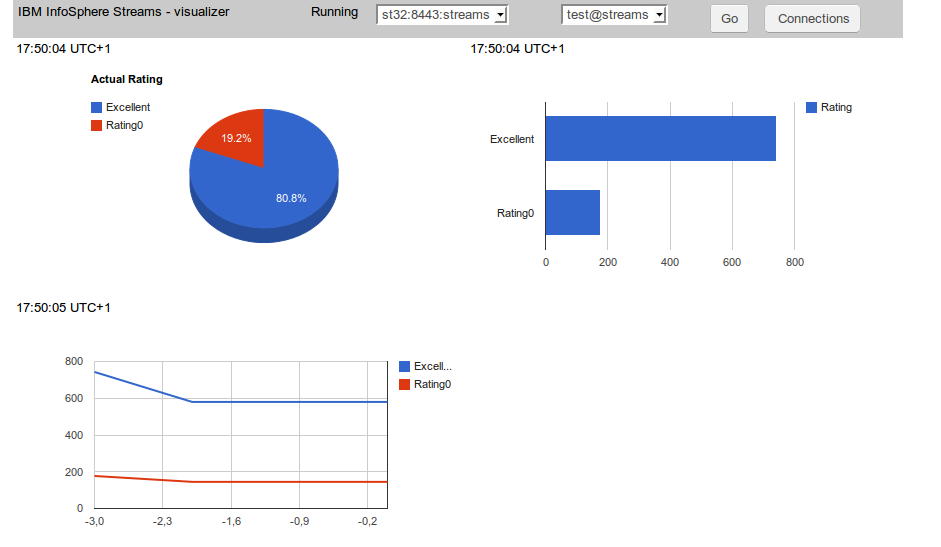
Source code for GWT application is available here. As a 'chart engine' Google Charts is used with GWT wrapping library.
Streams SPL code
It is a very simple SPL application. Source code is available here. Just generates randomly number 0 - 4 and counts all 0 as 'rating0' and all other numbers as 'excellent'.
Connections handling
Every connection is defined by host and port and authentication credentials (user and password). So a special module has been created for defining and storing a list of connections.

List is stored as a browser cookie entry. To keep connection 'database' separated an interface has been created.
Because one host can supervise more then one instance also combo box with the list of instances is created.
Localization
All strings used in the user interface are defined as com.google.gwt.i18n.client.Constants resource. For the time being only English version is created but no problem to add another locale resource.
Charts
Google Charts is used for this purpose together with GWT visualization interface. Three charts types are used: PieChart, BarChart and LineChart. A source code preparing and refreshing this charts is available here.
Access to Streams REST API
Because of the Same Origin Policy restriction it is not possible to make REST API call directly from GWT client application. So the call is made from the server side (Java) code and send to the client via RPC. The server side code is available here. The JSON string is sent unmodified and then decoded at the client side using GWT JSON package.
Conclusion
After resolving some technical issues the REST API access to IBM InfoSphere Streams seems to be quite easy and straightforward. The combination of GWT, Google Charts and REST API is very powerful and this basic application can serve as a basis for developing more complex solution.
One thing is to get access to IBM InfoSphere Streams via REST API but another thing is to make use of it. So I created a simple GWT application which connects to the Streams instance and monitors execution of SPL project (by reading operator custom metric) and displays the result as a graphic charts.
Source code for GWT application is available here. As a 'chart engine' Google Charts is used with GWT wrapping library.
Streams SPL code
It is a very simple SPL application. Source code is available here. Just generates randomly number 0 - 4 and counts all 0 as 'rating0' and all other numbers as 'excellent'.
Connections handling
Every connection is defined by host and port and authentication credentials (user and password). So a special module has been created for defining and storing a list of connections.
List is stored as a browser cookie entry. To keep connection 'database' separated an interface has been created.
/**
 *
 * @author sbartkowski
 * Container for database containing connections data
 */

public interface IDatabase {


        enum OP {
                ADD, REMOVE, CHANGE
        };

        // List of connections
        List getList();

        // Add, remove or change connection
        void databaseOp(OP op, ConnectionData data);

        // Test if connection exists (by host, port and user)
        boolean connectionExists(ConnectionData data);

        // Creates connection identifier host:port:user
        String toS(ConnectionData data);

        // Find connection by identifier
        ConnectionData findS(String s);

}
'Cookie' implementation is available here. This way it is possible to change the storing mechanism without affecting the rest of the application.Because one host can supervise more then one instance also combo box with the list of instances is created.
Localization
All strings used in the user interface are defined as com.google.gwt.i18n.client.Constants resource. For the time being only English version is created but no problem to add another locale resource.
Charts
Google Charts is used for this purpose together with GWT visualization interface. Three charts types are used: PieChart, BarChart and LineChart. A source code preparing and refreshing this charts is available here.
Access to Streams REST API
Because of the Same Origin Policy restriction it is not possible to make REST API call directly from GWT client application. So the call is made from the server side (Java) code and send to the client via RPC. The server side code is available here. The JSON string is sent unmodified and then decoded at the client side using GWT JSON package.
Conclusion
After resolving some technical issues the REST API access to IBM InfoSphere Streams seems to be quite easy and straightforward. The combination of GWT, Google Charts and REST API is very powerful and this basic application can serve as a basis for developing more complex solution.
piątek, 27 grudnia 2013
InfoSphere Streams, REST API, Java application
Introduction
InfoSphere Streams contains API (application programming interface) which can be used to get access to different data related to Streams instance. The API is based on REST and is implemented by using HTTP protocol. The format of data returned is JSON. More information is available here (chapter: REST API overview.
The API allows creating applications for monitoring and visualizing data related to the Strems instance and particular job or jobs. The Streams Console (provided with InforSphere Streams) is based on REST API. More information is available here (chapter: Streams Console )
Authentication
The REST API is supported by SWS (Streams Web Services chapter: Streams Web Services). There is a difference between instance authentication (for instance: to use streamtool) and SWS authentication. There are two methods of SWS authentication: server (default) and client. More information is available here (chapter: Configuring security for the InfoSphere Streams REST API).
Server authentication
It is the default method. Firstly let start Streams Console application from any browser. Streams Console is based on REST API and allows to check if SWS is up and running and authentication is possible.
After starting the instance use the streamtool to get URL for Streams Console.
Sample Java code
If client authentication method is enabled only trusted clients can connect to SWS and REST API. Unfortunately, this method is a little bit more complicated and requires more preparation.
Enable client authentication
It can be done from Streams Console. But the simplest method is to modify a file .streams/instances/{instanceid}/config/instance.properties and set SWS.enableClientAuthentication property to true.
Create and register client credentials
Create client credentials
Important: if the cn name (first and last name) is the same as instance owner then login name and the and password are not required during authentication.
keytool --export -keystore streamkey.p12 -alias streams -storetype pkcs12 -file my.crt
For instance (Chromium): Properties -> Advanced -> Certificates -> Import certificate
Add certificate to SWS client keystore
Open Streams Console again, should start without asking for credentials (if certificate first and last name is the same as instance owner, otherwise login and password is required)
Server certificate
Next step is to create server trust store at the client site. Unfortunately, there is not visible method for getting server certificate using streamtool. The only solution I found (after Streams Console is successfully opened) is exporting server certificate directly from browser. In case of firefox : Preferences -> Advanced -> List certifacates -> Servers -> IBM branch. Export certificate as X.509 (DERT) and create server truststore.
Important: for some reason the client keystore create above does not work here. The only solution I found is to backup client certicate in Web browser (Firefox: Preferences ->Advanced -> List certificates -> Personal -> Backup as PKCS12) and used keystore created that way.
Important: This example assumes that client certificate contains cn (first and last name) which maps to instance owner or valid Streams user, so the authorization is ignored. Otherwise it is necessary to add basic authentication also (like example above).
InfoSphere Streams contains API (application programming interface) which can be used to get access to different data related to Streams instance. The API is based on REST and is implemented by using HTTP protocol. The format of data returned is JSON. More information is available here (chapter: REST API overview.
The API allows creating applications for monitoring and visualizing data related to the Strems instance and particular job or jobs. The Streams Console (provided with InforSphere Streams) is based on REST API. More information is available here (chapter: Streams Console )
Authentication
The REST API is supported by SWS (Streams Web Services chapter: Streams Web Services). There is a difference between instance authentication (for instance: to use streamtool) and SWS authentication. There are two methods of SWS authentication: server (default) and client. More information is available here (chapter: Configuring security for the InfoSphere Streams REST API).
Server authentication
It is the default method. Firstly let start Streams Console application from any browser. Streams Console is based on REST API and allows to check if SWS is up and running and authentication is possible.
After starting the instance use the streamtool to get URL for Streams Console.
[streams@oc8442647460 ~]$ streamtool geturl -i test@streams

https://oc8442647460.ibm.com:8443/streams/console/login
If login to Streams Console is successful we are sure that the access data is valid.
Sample Java code
 static class BusinessIntelligenceX509TrustManager implements
   X509TrustManager {

  public java.security.cert.X509Certificate[] getAcceptedIssuers() {
   return new java.security.cert.X509Certificate[] {};
  }

  public void checkClientTrusted(
    java.security.cert.X509Certificate[] certs, String authType) {
   // no-op
  }

  public void checkServerTrusted(
    java.security.cert.X509Certificate[] certs, String authType) {
   // no-op
  }

 }

 public static void auth1() {
  try {

   TrustManager[] trustAllCerts = new TrustManager[] { new BusinessIntelligenceX509TrustManager() };
   SSLContext sc;

   try {
    sc = SSLContext.getInstance("SSL");
   } catch (NoSuchAlgorithmException noSuchAlgorithmException) {
    return;
   }

   try {
    sc.init(null, trustAllCerts, new java.security.SecureRandom());
   } catch (KeyManagementException keyManagementException) {

    return;
   }

   HostnameVerifier hv = new HostnameVerifier() {
    public boolean verify(String urlHostName, SSLSession session) {
     return true;
    }
   };

   HttpsURLConnection
     .setDefaultSSLSocketFactory(sc.getSocketFactory());
   HttpsURLConnection.setDefaultHostnameVerifier(hv);

   // Retrieve the root resource information for Infosphere Streams
   URL url = new URL("https://st32:8443/streams/rest/resources");
   String userInfo = "streams:secret123";
   String authToken = "Basic "
     + DatatypeConverter.printBase64Binary(userInfo.getBytes());
   HttpsURLConnection conn = (HttpsURLConnection) url.openConnection();
   conn.setRequestProperty("Authorization", authToken);
   conn.setRequestMethod("GET");
   conn.connect();
   System.out.println("Response code: " + conn.getResponseCode());
   System.out.println("Content type: "
     + conn.getHeaderField("Content-Type"));
   String response = new BufferedReader(new InputStreamReader(
     conn.getInputStream())).readLine();
   System.out.println("Response: " + response);
   conn.disconnect();
  } catch (Exception e) {
   e.printStackTrace();
  }
 }


 public static void main(String[] args) {
  auth1();
 }
Client authentication If client authentication method is enabled only trusted clients can connect to SWS and REST API. Unfortunately, this method is a little bit more complicated and requires more preparation.
Enable client authentication
It can be done from Streams Console. But the simplest method is to modify a file .streams/instances/{instanceid}/config/instance.properties and set SWS.enableClientAuthentication property to true.
Create and register client credentials
Create client credentials
Important: if the cn name (first and last name) is the same as instance owner then login name and the and password are not required during authentication.
keytool -genkey -keyalg RSA -alias streams -storepass secret -validity 360 -keysize 1024 -storetype pkcs12 -keystore streamkey.p12Add credentials to Web browser
keytool --export -keystore streamkey.p12 -alias streams -storetype pkcs12 -file my.crt
For instance (Chromium): Properties -> Advanced -> Certificates -> Import certificate
Add certificate to SWS client keystore
streamtool addcertificate --clientid sb -f my.crt -i test@streamsRestart instance
streamtool stopinstance -i test@streams
streamtool startinstance -i test@streams
Streams Console
Open Streams Console again, should start without asking for credentials (if certificate first and last name is the same as instance owner, otherwise login and password is required)
Server certificate
Next step is to create server trust store at the client site. Unfortunately, there is not visible method for getting server certificate using streamtool. The only solution I found (after Streams Console is successfully opened) is exporting server certificate directly from browser. In case of firefox : Preferences -> Advanced -> List certifacates -> Servers -> IBM branch. Export certificate as X.509 (DERT) and create server truststore.
keytool -import -alias streams -keystore servertrust -file serv.certJava sample
Important: for some reason the client keystore create above does not work here. The only solution I found is to backup client certicate in Web browser (Firefox: Preferences ->Advanced -> List certificates -> Personal -> Backup as PKCS12) and used keystore created that way.
Important: This example assumes that client certificate contains cn (first and last name) which maps to instance owner or valid Streams user, so the authorization is ignored. Otherwise it is necessary to add basic authentication also (like example above).
 static void auth3() {
  try {
   // Identify locations of server truststore and client keystore
   System.setProperty("javax.net.ssl.trustStore",
     "/home/sbartkowski/servertrust");
   System.setProperty("javax.net.ssl.trustStorePassword", "secret");
   System.setProperty("javax.net.ssl.keyStore",
     "/home/sbartkowski/clientkeystore.p12");
   System.setProperty("javax.net.ssl.keyStorePassword", "secret");
   System.setProperty("javax.net.ssl.keyStoreType", "pkcs12");
   System.setProperty("javax.net.debug", "ssl");

   HostnameVerifier hv = new HostnameVerifier() {
    public boolean verify(String urlHostName, SSLSession session) {
     return true;
    }
   };

   HttpsURLConnection.setDefaultHostnameVerifier(hv);

   // Retrieve the root resource information for Infosphere Streams
   URL url = new URL("https://st32:8443/streams/rest/resources");
   HttpsURLConnection conn = (HttpsURLConnection) url.openConnection();
   conn.connect();
   System.out.println("Response code: " + conn.getResponseCode());
   System.out.println("Content type: "
     + conn.getHeaderField("Content-Type"));
   String response = new BufferedReader(new InputStreamReader(
     conn.getInputStream())).readLine();
   System.out.println("Response: " + response);
   conn.disconnect();
  } catch (Exception e) {
   e.printStackTrace();
  }
 }
sobota, 7 grudnia 2013
IBM InfoSphere Streams, NetezzaLoad, ODBCAppend and input control operator
Introduction
In the previous post it was demonstrated how to connect to Netezza using connection data in the connections.xml file. But this method in not always convenient. For instance: assume we use different credentials in the test environment and production environment. Having credentials hardcoded in the connections.xml enforces recompiling our application every time it is deployed.
Solution
Happily there is a solution to this problem. It is possible also to send credentials during submit time and even to change them dynamically during a run time. It can be accomplished by applying "control" input stream to ODBCAppend and NetezzaLoad. Description (click on Operator Control Input Port). Unfortunately, there is no sample for this option and it is not obvious at the first glance how to use it.
Sample code
A sample code for connection using control input port is available here.

Remarks
In the previous post it was demonstrated how to connect to Netezza using connection data in the connections.xml file. But this method in not always convenient. For instance: assume we use different credentials in the test environment and production environment. Having credentials hardcoded in the connections.xml enforces recompiling our application every time it is deployed.
Solution
Happily there is a solution to this problem. It is possible also to send credentials during submit time and even to change them dynamically during a run time. It can be accomplished by applying "control" input stream to ODBCAppend and NetezzaLoad. Description (click on Operator Control Input Port). Unfortunately, there is no sample for this option and it is not obvious at the first glance how to use it.
Sample code
A sample code for connection using control input port is available here.

Remarks
- The producer of connection data is Custom operator submitting credentials to both operators (ODBCAppend and NetezzaLoad). Although the credentials are hardcoded here it is not a problem to get them from somewhere, for instance a configuration file.
- ODBCAppend and NetezzaLoad have a connectionPassword with invalid password hardcoded. It is on purpose to be sure that during a connection a password got from control port is used.
- ODBCAppend and NetezzaLoad have parameter connectionPolicy set to Deferred (default is Immediate). Otherwise both operators would try to initialize connection at the beginning and fail. By means of Deferred value the connection is not started until first tuple arrives.
- It is also necessary to postpone tuples arrival to ODBCAppend and NetezzaLoad until connection credentials are sent. Switch control serves as a gate between flow of tuples and both data operators. Switch operator having parameter start set to true serves as a gate latch.
- Custom operator sends credentials to ODBCAppend and NetezzaLoad and at the same time sends signal to Switch operator. The gate is broken and data can flow through not interrupted.
How it is visualized in the diagram above
- Beacon operator starts sending tuples. Tuples are sent (and blocked at the very beginning) to the FlowOfControl (Switch) operator.
- ControlPort (Custom) operator sends connection data to the ToODBC and NetezzaLoad operator.
- After sending the connection data sends a signal to FlowOfControl (Switch) operator to open a gate.
- At the arrival of first tuple the connection is started using (valid) credentials from control input port (not from connections.xml file or invalid connectionPassword parameter).
- Then the constant flow of tuples from producer (Beacon) to consumers (ODBAppend and NetezzaLoad) is running. Tuples are passing through FlowOfControl gate without any friction.
sobota, 30 listopada 2013
Netezza Software Emulator, Linux and IBM InfoSphere Streams
Introduction
Netezza and InfoSphere Streams are the part of IBM Big Data offering. Although both are commercial products, good news is that for educational and non-production purpose also free versions are available.
Netezza Software Emulator can be downloaded here.
Non-production InfoSphere Streams package is available here. Although fresh installation of IBM InfoSphere Streams is not complicated it is a good idea to start with ready to use VMware image.
Netezza Software Emulator
Netezza in production requires dedicated hardware but for developing and discovering one can play with VMware machines (Host and SPU) behaving exactly like the real Netezza database. The Netezza Emulator is available only for Windows but it is possible to execute it also under Linux. But keep in mind that IBM supports only Windows version so in case of any problems you are left on your own.
Netezza Software Emulator for Linux
Download and execute INSEfDsetup.exe (it requires at least 13GB free disk space). After downloading transfer unpacked VMware machines (c:\Program Files\IBM\Netezza Software Emulator for Developer\VMS) to the Linux machine. Before starting them create additional vmnet3 network.

This network connects Host and SPU machine. Important: switch off DHCP and set IP address as 10.0.0.1.
Starting Netezza Emulator
Firstly start Host machine. After several minutes log in as nz user (standard password: nz) and execute nzstate. If output is like:
This software can be downloaded from this place.Important: this software is available only for IBM customers and business partners.
Install and configure ODBC connection to Netezza on RedHat 6
Installing Netezza client is very simple and straightforward. Just unpack the Netezza client package (something like nz-linuxclient-v7.0.3-P2.tar.gz) and execute two unpack scripts, one in linux directory and the second in linux64 directory. The default installation location is /usr/local/nz.
Firstly test the connection by executing nzsqlodbc utility from /usr/local/nz/bin64 directory (netez is the host name of the HOST VMmachine in my environment).
Configure InfoShophere Streams environment to work with Netezza
It is described in detail here.
It looks complicated but it is enough to add three entries to .bashrc file.
Create a simple InfoSphere Streams application to load data to Netezza
Source code (StremsStudio project) is available here. There are two standard methods to load data to Netezza.
Hint. While working with connection.xml I found pretty difficult to identify error in this file because the StreamsStudio is not very talkative on this. But you can execute xmlint (XML syntax checker) directly from command line to get more explanatory output. Just copy and past command line invocation from StremsStudio console and remove redirection of error output to null device.
Next step is to launch application (as distributed), wait for the moment and verify the content of testt table.
Netezza and InfoSphere Streams are the part of IBM Big Data offering. Although both are commercial products, good news is that for educational and non-production purpose also free versions are available.
Netezza Software Emulator can be downloaded here.
Non-production InfoSphere Streams package is available here. Although fresh installation of IBM InfoSphere Streams is not complicated it is a good idea to start with ready to use VMware image.
Netezza Software Emulator
Netezza in production requires dedicated hardware but for developing and discovering one can play with VMware machines (Host and SPU) behaving exactly like the real Netezza database. The Netezza Emulator is available only for Windows but it is possible to execute it also under Linux. But keep in mind that IBM supports only Windows version so in case of any problems you are left on your own.
Netezza Software Emulator for Linux
Download and execute INSEfDsetup.exe (it requires at least 13GB free disk space). After downloading transfer unpacked VMware machines (c:\Program Files\IBM\Netezza Software Emulator for Developer\VMS) to the Linux machine. Before starting them create additional vmnet3 network.

This network connects Host and SPU machine. Important: switch off DHCP and set IP address as 10.0.0.1.
Starting Netezza Emulator
Firstly start Host machine. After several minutes log in as nz user (standard password: nz) and execute nzstate. If output is like:
[nz@netezza ~]$ nzstate
System state is 'Discovering'.
[nz@netezza ~]$ nzhw
Description HW ID Location   Role   State
----------- ----- ---------- ------ -------
SPA         1001  spa1       None   Ok
Disk        1002  spa1.disk1 Active None
Disk        1003  spa1.disk2 Active None
Disk        1004  spa1.disk3 Active None
Disk        1005  spa1.disk4 Active None
Disk        1006  spa1.disk5 Spare  None
SPU         1007  spa1.spu1  Active Booting
[nz@netezza ~]$
In case of any problem simply launch nzstart command. Next step is to start SPU machine. The SPU machine should connect to Host and start networked booting. Do not bother about a good number of technical messages flying through the screen, it is as expected and does not mean that something wrong is happening. After some time execute again nzstate command in the Host machine. If the screen is like:
[nz@netezza ~]$ nzhw
Description HW ID Location   Role   State
----------- ----- ---------- ------ ------
SPA         1001  spa1       None   Ok
Disk        1002  spa1.disk1 Active OkSQL> create table testt (numb integer,name varchar(100))
SQLRowCount returns -1
SQL> select * from testt;
+------------+-----------------------------------------------------------------------------------------------------+
| NUMB       | NAME                                                                                                |
+------------+-----------------------------------------------------------------------------------------------------+
+------------+-----------------------------------------------------------------------------------------------------+
SQLRowCount returns 0

Disk        1003  spa1.disk2 Active Ok
Disk        1004  spa1.disk3 Active Ok
Disk        1005  spa1.disk4 Active Ok
Disk        1006  spa1.disk5 Spare  Ok
SPU         1007  spa1.spu1  Active Online
[nz@netezza ~]$ nzstate
System state is 'Online'.
[nz@netezza ~]$
it means that Netezza is started and ready to handle the requests. Then prepare a test database, a test database and a test user.
  nzsql
  create database test;
  create user testuser with password 'secret';
  grant all admin to testuser;
  grant all on test to testuser;
Check if testuser can log in into test database and execute some basic queries.
 nzsql test -U testuser -W secret
 create table x (x int);
 insert into x values(1);
 select * from x;
 drop table x;
Obtain Netezza connection software
This software can be downloaded from this place.Important: this software is available only for IBM customers and business partners.
Install and configure ODBC connection to Netezza on RedHat 6
Installing Netezza client is very simple and straightforward. Just unpack the Netezza client package (something like nz-linuxclient-v7.0.3-P2.tar.gz) and execute two unpack scripts, one in linux directory and the second in linux64 directory. The default installation location is /usr/local/nz.
Firstly test the connection by executing nzsqlodbc utility from /usr/local/nz/bin64 directory (netez is the host name of the HOST VMmachine in my environment).
[root@oc8442647460 bin64]# ./nzodbcsql -h netez test testuser secret

NZODBCSQL - program to test Netezza ODBC driver
            NOT FOR PRODUCTION USE


     Type 'quit' or '\q' or CTRL-D or ENTER at the prompt to quit
     NOTE: Max 100 rows are displayed (for selects)

 Driver version  : 'Release 7.0.3 (P-2) [Build 32506]'
 NPS version  : '07.00.0003 Release 7.0.3 (P-2) [Build 32506]'
 Database  : 'TEST'


nzodbc >
Secondly configure unixODBC connection. That's very simple, just follow instructions in /usr/local/nz/lib64/ODBC_README note. In my environment I replaced host, database name, user name and password with netez,test,testuser and secret.
Then test the connection using isql utility.
[sb@oc8442647460 ~]$ rlwrap isql NZSQL
+---------------------------------------+
| Connected!                            |
|                                       |
| sql-statement                         |
| help [tablename]                      |
| quit                                  |
|                                       |
+---------------------------------------+
SQL> create table x (x int);
SQLRowCount returns -1
SQL> insert into x values(1);
SQLRowCount returns 1
SQL> select * from x;
+------------+
| X          |
+------------+
| 1          |
+------------+
SQLRowCount returns 1
1 rows fetched
SQL>
Important: I failed trying to configure unixODBC Netezza connection in Ubuntu (although nzodbcsql utility is working). Probably there are some incompatibilities with unixODBC version installed as default into Ubuntu.
Configure InfoShophere Streams environment to work with Netezza
It is described in detail here.
It looks complicated but it is enough to add three entries to .bashrc file.
export STREAMS_ADAPTERS_ODBC_NETEZZA=NETEZZA
export STREAMS_ADAPTERS_ODBC_INCPATH=/usr/include/
export STREAMS_ADAPTERS_ODBC_LIBPATH=/usr/lib64/
Important: InfoSphere Streams can work with one database only. So if a connection with Netezza is specified the access to other database (like DB2) is not possible.
Create a simple InfoSphere Streams application to load data to Netezza
Source code (StremsStudio project) is available here. There are two standard methods to load data to Netezza.
- Using ODBCAppend operator.
- Using specialized NetezzaLoad operator.
SQL> create table testt (numb integer,name varchar(100))
SQLRowCount returns -1
SQL> select * from testt;
+------------+-----------------------------------------------------------------------------------------------------+
| NUMB       | NAME                                                                                                |
+------------+-----------------------------------------------------------------------------------------------------+
+------------+-----------------------------------------------------------------------------------------------------+
SQLRowCount returns 0
Both methods require preparing connection.xml file. The connection.xml file used in this example is available here.
Hint. While working with connection.xml I found pretty difficult to identify error in this file because the StreamsStudio is not very talkative on this. But you can execute xmlint (XML syntax checker) directly from command line to get more explanatory output. Just copy and past command line invocation from StremsStudio console and remove redirection of error output to null device.
[sb@oc8442647460 NetezzaLoader]$ pwd
/home/sb/workspace/testp/NetezzaLoader
[sb@oc8442647460 NetezzaLoader]$ xmllint --noout --schema /opt/ibm/InfoSphereStreams/toolkits/com.ibm.streams.db/com.ibm.streams.db/Common/connection.xsd ./etc/connections.xml
./etc/connections.xml:29: parser error : Opening and ending tag mismatch: table line 23 and access_specification
    </access_specification>
                           ^
./etc/connections.xml:32: parser error : expected '>'
  </access_specifications>
                        ^
./etc/connections.xml:34: parser error : Opening and ending tag mismatch: access_specifications line 10 and st:connections
</st:connections>
                 ^
./etc/connections.xml:34: parser error : Premature end of data in tag connections line 1
</st:connections>
                  ^
[sb@oc8442647460 NetezzaLoader]$
The application code is available here. It is very simple. Beacon operator produces a series of randomly generated tuples. By modifying the iteration parameter one can increase the number of tuples generated. Removing this parameter for good produce the infinite sequence. Then the output is directed to ODBCAppend operator and and the same output is directed NetezzaPrepareLoad and NetezzaLoad operator putting it to the Netezza database.Next step is to launch application (as distributed), wait for the moment and verify the content of testt table.
--+
SQLRowCount returns 20
20 rows fetched
SQL> select * from testt;
+------------+-----------------------------------------------------------------------------------------------------+
| NUMB       | NAME                                                                                                |
+------------+-----------------------------------------------------------------------------------------------------+
| 31099      | I'm here                                                                                            |
| 35         | Good bye, cruel world                                                                               |
| 16515      | Good bye, cruel world                                                                               |
| 31099      | I'm here                                                                                            |
| 35         | Good bye, cruel world                                                                               |
| 16515      | Good bye, cruel world                                                                               |
| 5334       | Good bye, cruel world                                                                               |
| 1586       | Good bye, cruel world                                                                               |
| 5334       | Good bye, cruel world                                                                               |
| 1586       | Good bye, cruel world                                                                               |
| 14369      | Hello Kitty                                                                                         |
| 14369      | Hello Kitty                                                                                         |
| 8129       | Good bye, cruel world                                                                               |
| 4465       | Hello world                                                                                         |
| 8129       | Good bye, cruel world                                                                               |
| 4465       | Hello world                                                                                         |
| 15072      | I'm here                                                                                            |
| 20664      | Good bye, cruel world                                                                               |
| 15072      | I'm here                                                                                            |
| 20664      | Good bye, cruel world                                                                               |
+------------+-----------------------------------------------------------------------------------------------------+
SQLRowCount returns 20
20 rows fetched
SQL>
Subskrybuj:
Posty (Atom)