6 marca 2014 roku byliśmy na przedstawieniu "Wiśniowego sadu" Czechowa w Teatrze Studio Spektakl bardzo udany, ale nie powalał na kolana.
Dla potrzeb przedstawienia zostało zrobione nowe tłumaczenie, słyszymy współczesny język pozbawiony archaizmów. Na scenie nie widzimy także eleganckich ziemian przechadzających się w wytwornych wnętrzach. Także huczna zabawa na końcu przypomina dzisiejsze imprezowanie, a nie bal w dworskich pokojach. Rosyjskie realia z końca XIX wieku pojawiają się głównie w wypowiedziach Łopachina, dawnego chłopa pańszczyźnianego, który dzięki uwłaszczeniu jest pełnoprawnym gościem na pokojach, gdzie kiedyś wstęp dla takich jak on był nie do pomyślenia.
Z drugiej strony realizatorzy nie wtłaczają sztuki w jakiś współczesny kontekst, np. że Raniewscy to podupadający inteligenci, nie potrafiący zrozumieć, że ogłada, kultura i wykształcenie nic nie znaczą w konfrontacji z siłą pieniądza.
Ale to także jest słabością przedstawienia, które podobnie jak bohaterowie sztuki, jest zawieszone między starym i nowym. Główny zarzut jaki można postawić, że po prostu nie wzrusza, ani nie porusza. Najjaskrawiej wyraża to Trochinow. Wygłasza rewolucyjne kwestie, który mogłyby być zapowiedzią czasów, gdy nie tylko wiśniowy sad ale i cały świat którego częścią są Raniewscy zostanie wycięty, ale dla współczesnych widzów to staroświecka retoryka z epoki, która przeminęła 25 lat temu.
Sama fabuła sztuki jest przecież nieskomplikowana, jak ktoś słusznie zauważył, można ją streścić jako: "wiśniowy sad ma być sprzedany, wiśniowy sad jest właśnie sprzedawany, wiśniowy sad został sprzedany !". W tę banalną fabułę mamy wplecionych banalnych ludzi, ale poruszających kwestie dotyczące nas wszystkich. O sens i cel życia, jak zatrzymać uciekający czas ale jednocześnie podążać za nowymi czasami, jak być tam, gdzie jest nasze serce i wspomnienia a jednocześnie wyrwać się do wielkiego świata. Bohaterowie sztuki są szczęśliwi i jednocześnie nieszczęśliwi, cały czas czegoś szukają i na coś czekają, ale niczego nie znajdują i nic nie przychodzi.
Ale w przedstawieniu w Teatrze Studio tego nie widzimy ani nie słyszymy. Centralną postacią Raniewska, wzniosła i banalna, z jednej strony utracjuszka która zmarnotrawiła majątek rodzinny na wystawne życie w Paryża, z drugiej strony kobieta szukająca miłości i fatalnie lokująca swoje uczucia w mężczyznach, którzy na to nie zasługują. Wszystko się obraca wokół niej, osoby z otoczenia wiedzą o jej wadach, ale jednocześnie kochają ją. Ale w przedstawieniu widzimy tylko podstarzałą utracjuszkę używającą życia i topiącą smutki w alkoholu i przygodnych romansach. Żadna z postaci nas nie porusza, ani nie wzbudza sympatii czy nawet antypatii, co najwyżej irytację, jak brat Raniewskiej, Gajew sprawiający wrażenie jakby cały czas był w oparach alkoholu. Jedyną jasną postacią jest Łopachin, doskonale rozumiejący, że aby wspiąć się na wyższy szczebel drabiny społecznej nie wystarczy pełny portfel czy nawet zakup majątku dawnych panów.
Osią sztuki jest odchodzący w niebyt dawny świat, ale nas to nie wzrusza, gdyż ten świat jest zupełnie pozbawiony wdzięku czy uroku, nawet jeśli tym światem było próżniacze życie arystokratów. Wielkim nieobecnym jest także tytułowy bohater, czyli sam wiśniowy sad. Wiśniowy sad jest jak "white elephant", czy artefakt bardzo efektowny i prestiżowy (wzmiankowany - jak Gajew podkreśla z dumą - nawet w Encyklopedii), ale całkowicie bezużyteczny. W przedstawieniu pojawia się tylko w słownych kwestiach i długich spojrzeniach aktorów zawieszonych w okolicy widowni. Widzom trudno więc zrozumieć, dlaczego Raniewska nawet nie chce słyszeć o wycięciu sadu i rozparcelowaniu terenu na działki rekreacyjne, chociaż jest to jedyny realistyczny plan uratowania majątku czy dlaczego mówi "jeśli ma być sprzedany sad, to ja zostanę sprzedana razem z nim". Więc i finał przedstawienia, którym jest przecież zagłada wiśniowego sadu także nie wzbudza echa.
Zaletą przedstawienia jest po prostu samo przedstawienie, czyli bardzo dobra gra aktorów, ładna inscenizacja, efektowny i dynamiczny taniec w III akcie oraz warkocz a'la Julia Tymoszenko Raniewskiej w końcowym akcie, który w świetle ostatnich wydarzeń z Ukrainy nabrał nowego znaczenia, nie przewidzianego przez reżyserkę.
piątek, 28 lutego 2014

środa, 8 stycznia 2014
IBM InfoSphere Streams, REST API and GWT
Introduction
One thing is to get access to IBM InfoSphere Streams via REST API but another thing is to make use of it. So I created a simple GWT application which connects to the Streams instance and monitors execution of SPL project (by reading operator custom metric) and displays the result as a graphic charts.
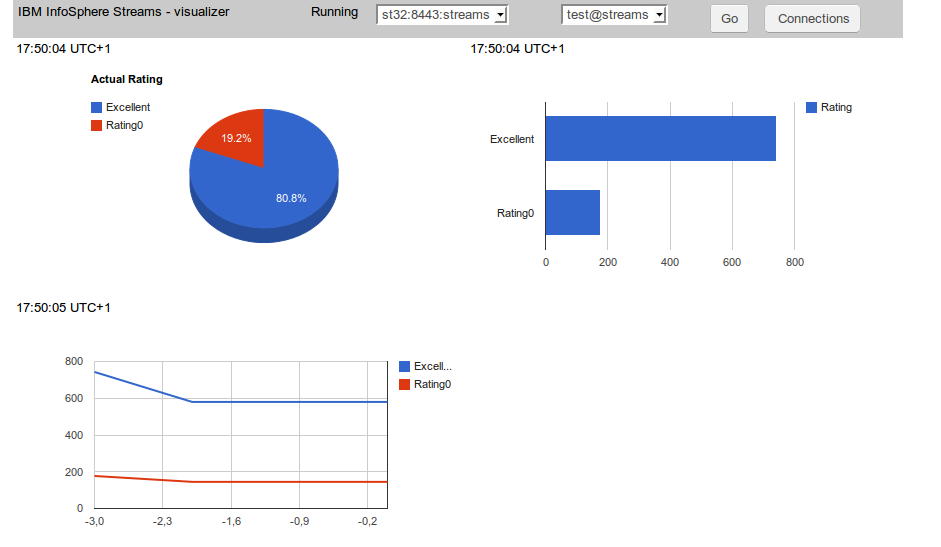
Source code for GWT application is available here. As a 'chart engine' Google Charts is used with GWT wrapping library.
Streams SPL code
It is a very simple SPL application. Source code is available here. Just generates randomly number 0 - 4 and counts all 0 as 'rating0' and all other numbers as 'excellent'.
Connections handling
Every connection is defined by host and port and authentication credentials (user and password). So a special module has been created for defining and storing a list of connections.

List is stored as a browser cookie entry. To keep connection 'database' separated an interface has been created.
Because one host can supervise more then one instance also combo box with the list of instances is created.
Localization
All strings used in the user interface are defined as com.google.gwt.i18n.client.Constants resource. For the time being only English version is created but no problem to add another locale resource.
Charts
Google Charts is used for this purpose together with GWT visualization interface. Three charts types are used: PieChart, BarChart and LineChart. A source code preparing and refreshing this charts is available here.
Access to Streams REST API
Because of the Same Origin Policy restriction it is not possible to make REST API call directly from GWT client application. So the call is made from the server side (Java) code and send to the client via RPC. The server side code is available here. The JSON string is sent unmodified and then decoded at the client side using GWT JSON package.
Conclusion
After resolving some technical issues the REST API access to IBM InfoSphere Streams seems to be quite easy and straightforward. The combination of GWT, Google Charts and REST API is very powerful and this basic application can serve as a basis for developing more complex solution.
One thing is to get access to IBM InfoSphere Streams via REST API but another thing is to make use of it. So I created a simple GWT application which connects to the Streams instance and monitors execution of SPL project (by reading operator custom metric) and displays the result as a graphic charts.
Source code for GWT application is available here. As a 'chart engine' Google Charts is used with GWT wrapping library.
Streams SPL code
It is a very simple SPL application. Source code is available here. Just generates randomly number 0 - 4 and counts all 0 as 'rating0' and all other numbers as 'excellent'.
Connections handling
Every connection is defined by host and port and authentication credentials (user and password). So a special module has been created for defining and storing a list of connections.
List is stored as a browser cookie entry. To keep connection 'database' separated an interface has been created.
/**
 *
 * @author sbartkowski
 * Container for database containing connections data
 */

public interface IDatabase {


        enum OP {
                ADD, REMOVE, CHANGE
        };

        // List of connections
        List getList();

        // Add, remove or change connection
        void databaseOp(OP op, ConnectionData data);

        // Test if connection exists (by host, port and user)
        boolean connectionExists(ConnectionData data);

        // Creates connection identifier host:port:user
        String toS(ConnectionData data);

        // Find connection by identifier
        ConnectionData findS(String s);

}
'Cookie' implementation is available here. This way it is possible to change the storing mechanism without affecting the rest of the application.Because one host can supervise more then one instance also combo box with the list of instances is created.
Localization
All strings used in the user interface are defined as com.google.gwt.i18n.client.Constants resource. For the time being only English version is created but no problem to add another locale resource.
Charts
Google Charts is used for this purpose together with GWT visualization interface. Three charts types are used: PieChart, BarChart and LineChart. A source code preparing and refreshing this charts is available here.
Access to Streams REST API
Because of the Same Origin Policy restriction it is not possible to make REST API call directly from GWT client application. So the call is made from the server side (Java) code and send to the client via RPC. The server side code is available here. The JSON string is sent unmodified and then decoded at the client side using GWT JSON package.
Conclusion
After resolving some technical issues the REST API access to IBM InfoSphere Streams seems to be quite easy and straightforward. The combination of GWT, Google Charts and REST API is very powerful and this basic application can serve as a basis for developing more complex solution.
poniedziałek, 6 stycznia 2014
Byliśmy na przedstawieniu
19 grudnia (czwartek) 2014 roku byliśmy na przedstawieniu w Teatrze Wielkim "Jolanta, Zamek Sinobrodego", podobało nam się bardzo.
Trudno sobie wyobrazić bardziej kontrastujące zestawienie, jak ostatnia opera Czajkowskiego "Jolanta" i opera Beli Bartoka "Zamek Sinobrodego", dzieła stworzone w całkowicie odmiennej estetyce i konwencji artystycznej, jedno wyznacza koniec pewnej epoki muzycznej a drugie początek nowej. Można szukać przyciągania na zasadzie kontrastu, "Jolanta" to świat ludzi doświadczających obecności Boga, zaś "Zamek Sinobrodego" to świat, gdzie dla Boga miejsca nie ma. Można szukać podobieństw, jedna i druga opera to baśnie, zaś treścią obu jest relacja kobiety i silnego mężczyzny. Według zamysłu reżysera przedstawienia, Mariusza Terlińskiego, nicią łączącą obie opery jest bohaterka Jolanta/Judyta. W pierwszej części Jolanta wyzwala się z fantastycznego świata, odzyskuje wzrok i przechodzi do świata normalnego, zaś w drugiej części Judyta porzuca świat normalny i zamyka się ponownie w baśniowym, nierealnym świecie Sinobrodego.
Zdecydowana większość widzów w Teatrze zapewne jednak nie przeprowadzała tego typu analiz, a po prostu z ogromnym zainteresowaniem i przyjemnością słuchała i oglądała fascynujące przedstawienie. Jedność obu części tworzył "ten trzeci", czyli wspaniała inscenizacja Borisa Kudlički. Gdy Judyta śpiewa "Twój zamek krwawi, krwawy jest ten zamek, cierpiący, krwawy", to nie tylko śpiew powoduje, że widzowie niemal wyczuwają fizyczną obecność Zamku. W operze Czajkowskiego inscenizacja wspaniale uwidacznia nierealny, wytworzony wyobraźnią, wewnętrzny świat Jolanty. Wrażenie potęgują piękne i dyskretne projekcje wideo.
"Last but not least" to także wspaniałe wykonawstwo, muzyczne i wokalne. Przebieg akcji w obu operach jest oparty na kontraście, rola kobieca i męska. Piękna i baśniowa Jolanta kontra ojciec, który dla jej dobra stworzył dla niej nierealny świat, zaś w operze Bartoka spokojny i majestatyczny Sinobrody, który jest jednak bezradny wobec Judyty, odsłaniającej kolejne tajemnice jego świata. Wszystko zostało doskonale i perfekcyjnie wykonane.
Oby w Teatrze Wielkim była wystawianych jak najwięcej takich przedstawień, nowatorskich, ale bez uciekania się do przesadnego unowocześniania i uatrakcyjniania.
Trudno sobie wyobrazić bardziej kontrastujące zestawienie, jak ostatnia opera Czajkowskiego "Jolanta" i opera Beli Bartoka "Zamek Sinobrodego", dzieła stworzone w całkowicie odmiennej estetyce i konwencji artystycznej, jedno wyznacza koniec pewnej epoki muzycznej a drugie początek nowej. Można szukać przyciągania na zasadzie kontrastu, "Jolanta" to świat ludzi doświadczających obecności Boga, zaś "Zamek Sinobrodego" to świat, gdzie dla Boga miejsca nie ma. Można szukać podobieństw, jedna i druga opera to baśnie, zaś treścią obu jest relacja kobiety i silnego mężczyzny. Według zamysłu reżysera przedstawienia, Mariusza Terlińskiego, nicią łączącą obie opery jest bohaterka Jolanta/Judyta. W pierwszej części Jolanta wyzwala się z fantastycznego świata, odzyskuje wzrok i przechodzi do świata normalnego, zaś w drugiej części Judyta porzuca świat normalny i zamyka się ponownie w baśniowym, nierealnym świecie Sinobrodego.
Zdecydowana większość widzów w Teatrze zapewne jednak nie przeprowadzała tego typu analiz, a po prostu z ogromnym zainteresowaniem i przyjemnością słuchała i oglądała fascynujące przedstawienie. Jedność obu części tworzył "ten trzeci", czyli wspaniała inscenizacja Borisa Kudlički. Gdy Judyta śpiewa "Twój zamek krwawi, krwawy jest ten zamek, cierpiący, krwawy", to nie tylko śpiew powoduje, że widzowie niemal wyczuwają fizyczną obecność Zamku. W operze Czajkowskiego inscenizacja wspaniale uwidacznia nierealny, wytworzony wyobraźnią, wewnętrzny świat Jolanty. Wrażenie potęgują piękne i dyskretne projekcje wideo.
"Last but not least" to także wspaniałe wykonawstwo, muzyczne i wokalne. Przebieg akcji w obu operach jest oparty na kontraście, rola kobieca i męska. Piękna i baśniowa Jolanta kontra ojciec, który dla jej dobra stworzył dla niej nierealny świat, zaś w operze Bartoka spokojny i majestatyczny Sinobrody, który jest jednak bezradny wobec Judyty, odsłaniającej kolejne tajemnice jego świata. Wszystko zostało doskonale i perfekcyjnie wykonane.
Oby w Teatrze Wielkim była wystawianych jak najwięcej takich przedstawień, nowatorskich, ale bez uciekania się do przesadnego unowocześniania i uatrakcyjniania.
czwartek, 2 stycznia 2014
JavaHotel - customer/guest description improved
I deployed new version of JavaHotel application. English and Polish version is available as Google App Engine application. Also J2EE version (Tomcat and Glassfish) has been created. The main enhancement is the more extensive customer description.

Also Polish version is available having localized messages and dictionaries and some smaller improvements.

Also Polish version is available having localized messages and dictionaries and some smaller improvements.
piątek, 27 grudnia 2013
InfoSphere Streams, REST API, Java application
Introduction
InfoSphere Streams contains API (application programming interface) which can be used to get access to different data related to Streams instance. The API is based on REST and is implemented by using HTTP protocol. The format of data returned is JSON. More information is available here (chapter: REST API overview.
The API allows creating applications for monitoring and visualizing data related to the Strems instance and particular job or jobs. The Streams Console (provided with InforSphere Streams) is based on REST API. More information is available here (chapter: Streams Console )
Authentication
The REST API is supported by SWS (Streams Web Services chapter: Streams Web Services). There is a difference between instance authentication (for instance: to use streamtool) and SWS authentication. There are two methods of SWS authentication: server (default) and client. More information is available here (chapter: Configuring security for the InfoSphere Streams REST API).
Server authentication
It is the default method. Firstly let start Streams Console application from any browser. Streams Console is based on REST API and allows to check if SWS is up and running and authentication is possible.
After starting the instance use the streamtool to get URL for Streams Console.
Sample Java code
If client authentication method is enabled only trusted clients can connect to SWS and REST API. Unfortunately, this method is a little bit more complicated and requires more preparation.
Enable client authentication
It can be done from Streams Console. But the simplest method is to modify a file .streams/instances/{instanceid}/config/instance.properties and set SWS.enableClientAuthentication property to true.
Create and register client credentials
Create client credentials
Important: if the cn name (first and last name) is the same as instance owner then login name and the and password are not required during authentication.
keytool --export -keystore streamkey.p12 -alias streams -storetype pkcs12 -file my.crt
For instance (Chromium): Properties -> Advanced -> Certificates -> Import certificate
Add certificate to SWS client keystore
Open Streams Console again, should start without asking for credentials (if certificate first and last name is the same as instance owner, otherwise login and password is required)
Server certificate
Next step is to create server trust store at the client site. Unfortunately, there is not visible method for getting server certificate using streamtool. The only solution I found (after Streams Console is successfully opened) is exporting server certificate directly from browser. In case of firefox : Preferences -> Advanced -> List certifacates -> Servers -> IBM branch. Export certificate as X.509 (DERT) and create server truststore.
Important: for some reason the client keystore create above does not work here. The only solution I found is to backup client certicate in Web browser (Firefox: Preferences ->Advanced -> List certificates -> Personal -> Backup as PKCS12) and used keystore created that way.
Important: This example assumes that client certificate contains cn (first and last name) which maps to instance owner or valid Streams user, so the authorization is ignored. Otherwise it is necessary to add basic authentication also (like example above).
InfoSphere Streams contains API (application programming interface) which can be used to get access to different data related to Streams instance. The API is based on REST and is implemented by using HTTP protocol. The format of data returned is JSON. More information is available here (chapter: REST API overview.
The API allows creating applications for monitoring and visualizing data related to the Strems instance and particular job or jobs. The Streams Console (provided with InforSphere Streams) is based on REST API. More information is available here (chapter: Streams Console )
Authentication
The REST API is supported by SWS (Streams Web Services chapter: Streams Web Services). There is a difference between instance authentication (for instance: to use streamtool) and SWS authentication. There are two methods of SWS authentication: server (default) and client. More information is available here (chapter: Configuring security for the InfoSphere Streams REST API).
Server authentication
It is the default method. Firstly let start Streams Console application from any browser. Streams Console is based on REST API and allows to check if SWS is up and running and authentication is possible.
After starting the instance use the streamtool to get URL for Streams Console.
[streams@oc8442647460 ~]$ streamtool geturl -i test@streams

https://oc8442647460.ibm.com:8443/streams/console/login
If login to Streams Console is successful we are sure that the access data is valid.
Sample Java code
 static class BusinessIntelligenceX509TrustManager implements
   X509TrustManager {

  public java.security.cert.X509Certificate[] getAcceptedIssuers() {
   return new java.security.cert.X509Certificate[] {};
  }

  public void checkClientTrusted(
    java.security.cert.X509Certificate[] certs, String authType) {
   // no-op
  }

  public void checkServerTrusted(
    java.security.cert.X509Certificate[] certs, String authType) {
   // no-op
  }

 }

 public static void auth1() {
  try {

   TrustManager[] trustAllCerts = new TrustManager[] { new BusinessIntelligenceX509TrustManager() };
   SSLContext sc;

   try {
    sc = SSLContext.getInstance("SSL");
   } catch (NoSuchAlgorithmException noSuchAlgorithmException) {
    return;
   }

   try {
    sc.init(null, trustAllCerts, new java.security.SecureRandom());
   } catch (KeyManagementException keyManagementException) {

    return;
   }

   HostnameVerifier hv = new HostnameVerifier() {
    public boolean verify(String urlHostName, SSLSession session) {
     return true;
    }
   };

   HttpsURLConnection
     .setDefaultSSLSocketFactory(sc.getSocketFactory());
   HttpsURLConnection.setDefaultHostnameVerifier(hv);

   // Retrieve the root resource information for Infosphere Streams
   URL url = new URL("https://st32:8443/streams/rest/resources");
   String userInfo = "streams:secret123";
   String authToken = "Basic "
     + DatatypeConverter.printBase64Binary(userInfo.getBytes());
   HttpsURLConnection conn = (HttpsURLConnection) url.openConnection();
   conn.setRequestProperty("Authorization", authToken);
   conn.setRequestMethod("GET");
   conn.connect();
   System.out.println("Response code: " + conn.getResponseCode());
   System.out.println("Content type: "
     + conn.getHeaderField("Content-Type"));
   String response = new BufferedReader(new InputStreamReader(
     conn.getInputStream())).readLine();
   System.out.println("Response: " + response);
   conn.disconnect();
  } catch (Exception e) {
   e.printStackTrace();
  }
 }


 public static void main(String[] args) {
  auth1();
 }
Client authentication If client authentication method is enabled only trusted clients can connect to SWS and REST API. Unfortunately, this method is a little bit more complicated and requires more preparation.
Enable client authentication
It can be done from Streams Console. But the simplest method is to modify a file .streams/instances/{instanceid}/config/instance.properties and set SWS.enableClientAuthentication property to true.
Create and register client credentials
Create client credentials
Important: if the cn name (first and last name) is the same as instance owner then login name and the and password are not required during authentication.
keytool -genkey -keyalg RSA -alias streams -storepass secret -validity 360 -keysize 1024 -storetype pkcs12 -keystore streamkey.p12Add credentials to Web browser
keytool --export -keystore streamkey.p12 -alias streams -storetype pkcs12 -file my.crt
For instance (Chromium): Properties -> Advanced -> Certificates -> Import certificate
Add certificate to SWS client keystore
streamtool addcertificate --clientid sb -f my.crt -i test@streamsRestart instance
streamtool stopinstance -i test@streams
streamtool startinstance -i test@streams
Streams Console
Open Streams Console again, should start without asking for credentials (if certificate first and last name is the same as instance owner, otherwise login and password is required)
Server certificate
Next step is to create server trust store at the client site. Unfortunately, there is not visible method for getting server certificate using streamtool. The only solution I found (after Streams Console is successfully opened) is exporting server certificate directly from browser. In case of firefox : Preferences -> Advanced -> List certifacates -> Servers -> IBM branch. Export certificate as X.509 (DERT) and create server truststore.
keytool -import -alias streams -keystore servertrust -file serv.certJava sample
Important: for some reason the client keystore create above does not work here. The only solution I found is to backup client certicate in Web browser (Firefox: Preferences ->Advanced -> List certificates -> Personal -> Backup as PKCS12) and used keystore created that way.
Important: This example assumes that client certificate contains cn (first and last name) which maps to instance owner or valid Streams user, so the authorization is ignored. Otherwise it is necessary to add basic authentication also (like example above).
 static void auth3() {
  try {
   // Identify locations of server truststore and client keystore
   System.setProperty("javax.net.ssl.trustStore",
     "/home/sbartkowski/servertrust");
   System.setProperty("javax.net.ssl.trustStorePassword", "secret");
   System.setProperty("javax.net.ssl.keyStore",
     "/home/sbartkowski/clientkeystore.p12");
   System.setProperty("javax.net.ssl.keyStorePassword", "secret");
   System.setProperty("javax.net.ssl.keyStoreType", "pkcs12");
   System.setProperty("javax.net.debug", "ssl");

   HostnameVerifier hv = new HostnameVerifier() {
    public boolean verify(String urlHostName, SSLSession session) {
     return true;
    }
   };

   HttpsURLConnection.setDefaultHostnameVerifier(hv);

   // Retrieve the root resource information for Infosphere Streams
   URL url = new URL("https://st32:8443/streams/rest/resources");
   HttpsURLConnection conn = (HttpsURLConnection) url.openConnection();
   conn.connect();
   System.out.println("Response code: " + conn.getResponseCode());
   System.out.println("Content type: "
     + conn.getHeaderField("Content-Type"));
   String response = new BufferedReader(new InputStreamReader(
     conn.getInputStream())).readLine();
   System.out.println("Response: " + response);
   conn.disconnect();
  } catch (Exception e) {
   e.printStackTrace();
  }
 }
niedziela, 22 grudnia 2013
JavaHotel - reservation panel improved
New version of JavaHotel has been uploaded (U/P user/user). The main difference is improved reservation panel : more compact, better navigation and better visualization of reservation.

The main challenge I fought with was adding colspan to CellTable. After spending a lot of time trying to apply different methods I ended up with copying and pasting DefaultCellTableBuilder and adding necessary changed to the underlying algorithm.
sobota, 7 grudnia 2013
IBM InfoSphere Streams, NetezzaLoad, ODBCAppend and input control operator
Introduction
In the previous post it was demonstrated how to connect to Netezza using connection data in the connections.xml file. But this method in not always convenient. For instance: assume we use different credentials in the test environment and production environment. Having credentials hardcoded in the connections.xml enforces recompiling our application every time it is deployed.
Solution
Happily there is a solution to this problem. It is possible also to send credentials during submit time and even to change them dynamically during a run time. It can be accomplished by applying "control" input stream to ODBCAppend and NetezzaLoad. Description (click on Operator Control Input Port). Unfortunately, there is no sample for this option and it is not obvious at the first glance how to use it.
Sample code
A sample code for connection using control input port is available here.

Remarks
In the previous post it was demonstrated how to connect to Netezza using connection data in the connections.xml file. But this method in not always convenient. For instance: assume we use different credentials in the test environment and production environment. Having credentials hardcoded in the connections.xml enforces recompiling our application every time it is deployed.
Solution
Happily there is a solution to this problem. It is possible also to send credentials during submit time and even to change them dynamically during a run time. It can be accomplished by applying "control" input stream to ODBCAppend and NetezzaLoad. Description (click on Operator Control Input Port). Unfortunately, there is no sample for this option and it is not obvious at the first glance how to use it.
Sample code
A sample code for connection using control input port is available here.

Remarks
- The producer of connection data is Custom operator submitting credentials to both operators (ODBCAppend and NetezzaLoad). Although the credentials are hardcoded here it is not a problem to get them from somewhere, for instance a configuration file.
- ODBCAppend and NetezzaLoad have a connectionPassword with invalid password hardcoded. It is on purpose to be sure that during a connection a password got from control port is used.
- ODBCAppend and NetezzaLoad have parameter connectionPolicy set to Deferred (default is Immediate). Otherwise both operators would try to initialize connection at the beginning and fail. By means of Deferred value the connection is not started until first tuple arrives.
- It is also necessary to postpone tuples arrival to ODBCAppend and NetezzaLoad until connection credentials are sent. Switch control serves as a gate between flow of tuples and both data operators. Switch operator having parameter start set to true serves as a gate latch.
- Custom operator sends credentials to ODBCAppend and NetezzaLoad and at the same time sends signal to Switch operator. The gate is broken and data can flow through not interrupted.
How it is visualized in the diagram above
- Beacon operator starts sending tuples. Tuples are sent (and blocked at the very beginning) to the FlowOfControl (Switch) operator.
- ControlPort (Custom) operator sends connection data to the ToODBC and NetezzaLoad operator.
- After sending the connection data sends a signal to FlowOfControl (Switch) operator to open a gate.
- At the arrival of first tuple the connection is started using (valid) credentials from control input port (not from connections.xml file or invalid connectionPassword parameter).
- Then the constant flow of tuples from producer (Beacon) to consumers (ODBAppend and NetezzaLoad) is running. Tuples are passing through FlowOfControl gate without any friction.
Subskrybuj:
Posty (Atom)