W dniu 6 kwietnia 2012 byliśmy na finałowym koncercie XVI Wielkanocnego Koncertu Beethovenowskiego, muzyka się nam podobała, ale reżyseria koncertu mniej.
Męczeństwo Świętego Sebastiana Claude'a Debussego to rzadko wykonywana muzyka tego kompozytora, według zapewnień organizatorów było to pierwsze wykonanie w Polsce. Pierwotnie była skomponowana jako ilustracja muzyczna do sztuki Gabriele d'Annunzia. Sama sztuka jednak nie zdobyła sobie powodzenia i została natychmiast zapomniana. Natomiast muzyka na szczęście nie podzieliła losu sztuki. Oczywiście nie ma możliwości odtwarzania muzyki tak jak to zamierzał kompozytor, najczęściej jest wykonywania jako czteroczęściowa suita.
Ale co się nam nie podobało ? Było złym pomysłem wprowadzenie narracji przed rozpoczęciem każdego aktu, nawet jeśli wygłaszającym tekst był znakomity aktor Andrzej Seweryn. To nie są porywające czy niezwykłe teksty, można było je opuścić bez żadnego zubożenia koncertu. Natomiast rozbijało to ciągłość i utrudniało odbiór muzyki. A wielka szkoda, bo muzyka jest bardzo efektowna, właśnie za to tak lubimy Debussiego. Bardzo zmienna, dynamiczna, bogato zinstrumentalizowana, z dużą rolą instrumentów dętych. Dodatkowo w bardzo dobrym wykonawstwie Sinfonii Varsovii, Chóru Filharmonii Narodowej, solistek (chociaż tutaj miały mniejsze pole do popisu), zaś całością bardzo dobrze dyrygował Sylvain Cambreling.
Na pewno bardzo dobrym pomysłem organizatorów było sięgnięcie po mniej znany, ale także znakomity repertuar. Ale wielka szkoda, że efekt został trochę zniweczony przez nieprzemyślaną koncepcją realizatorską.
wtorek, 17 kwietnia 2012

poniedziałek, 16 kwietnia 2012
Google App Engine and getLocalizedMessage
Problem
I found a nasty problem in Google App Engine - look at this JSP code.
Sometimes it is very useful to get localized message in JSP scriplet. For instance, to use it as a parameter to other java method or as a attribute value to a JSP tag.
Solution
The only solution I found is to use BundleSupport class directly and create custom getMessage method.
It looks as below:
Source code
The whole project is available here.
I found a nasty problem in Google App Engine - look at this JSP code.
Sometimes it is very useful to get localized message in JSP scriplet. For instance, to use it as a parameter to other java method or as a attribute value to a JSP tag.
<%
  String hello = LocaleSupport.getLocalizedMessage(pageContext, "Hello");
  Object params[] = { "John" };
  String helloJohn = LocaleSupport.getLocalizedMessage(pageContext, "HelloName",params);
%>
But the code above does not work in Google App Engine (run). What is worse - it works in development mode but after deploying to Google App Engine one gets into trouble. So it is not easy to recognize this issue, particularly in a larger project./notworkinghello.jsp java.lang.NoClassDefFoundError: org/apache/taglibs/standard/tag/common/fmt/BundleSupport at javax.servlet.jsp.jstl.fmt.LocaleSupport.getLocalizedMessage(LocaleSupport.java:143) at javax.servlet.jsp.jstl.fmt.LocaleSupport.getLocalizedMessage(LocaleSupport.java:63) at org.apache.jsp.notworkinghello_jsp._jspService(notworkinghello_jsp.java:72) ......What is more interesting, JSTL Code fmt:message tag is working as expected.
Solution
The only solution I found is to use BundleSupport class directly and create custom getMessage method.
It looks as below:
import java.text.MessageFormat;
import java.util.ResourceBundle;

import javax.servlet.jsp.PageContext;
import javax.servlet.jsp.jstl.fmt.LocalizationContext;

import org.apache.taglibs.standard.tag.common.fmt.BundleSupport;

public class GetLocalizedMessage {

 /**
  * Replacement for LocaleSupport.getLocalizedMessage method in JSP pages
  * Before calling set fmt:setLocale and fmt: setBundle
  */

 private GetLocalizedMessage() {

 }

 /**
  * Gets localized message (also MessageFormated) from I18N bundle
  * @param pageContext PageContext
  * @param key Message key
  * @param params List of parameters for MessageFormat (if exists)
  * @return localized message
  */
 public static String getMessage(PageContext pageContext, String key,
   String... params) {

  LocalizationContext loca = BundleSupport.getLocalizationContext(
    pageContext);
  ResourceBundle bundle = loca.getResourceBundle();
  String message = bundle.getString(key);
  if (params.length == 0) {
   return message;
  }
  String mess = MessageFormat.format(message, params);
  return mess;
 }

}
Then instead of getLocalizedMessage method from LocaleSupport class use method above directly - as source below.<% String hello = GetLocalizedMessage.getMessage(pageContext, "Hello"); String helloJohn = GetLocalizedMessage.getMessage(pageContext, "HelloName","John"); %>The rest of the JSP page can be left without change. Finally the JSP page works as expected also in Google App Engine.
Source code
The whole project is available here.
sobota, 7 kwietnia 2012
Byliśmy na koncercie
W dniu 1 kwietnia 2012 roku byliśmy na koncercie w ramach XVI Festiwalu Beethovenowskiego, podobało nam się bardzo. Sam koncert odbył się w pięknym wnętrzu Sali Wielkiej Zamku Królewskiego.
Hołdem złożonym dla patrona festiwalu było wykonanie Sonaty na wiolonczelę i fortepian D-dur op. 102 nr 2, ale to na pewno nie Beethoven było głównym bohaterem tego koncertu. Sam koncert wypełniła muzyka kompozytorów XX wiecznych, zaś zgodnie z intencją organizatorów koncertu motywem łączącym utwory była wojna i związki z wojną.
Ogromnie nam się podobał wykonany na koniec "Kwartet na koniec czasu" Oliviera Messiaena, tym bardziej że muzyka tego kompozytora nie tak często gości w Warszawie. Prawykonanie utworu odbyło się w okolicznościach niezwykłych, gdy kompozytor przebywał w obozie jenieckim w Zgorzelcu. Nadzorcy więzienni okazali się być miłośnikami muzyki, którzy umożliwili kompozytorowi pracę na utworem, zaś dobór instrumentów (klarnet, skrzypce, wiolonczela i fortepian na którym grał kompozytor) był wymuszony faktem, że akurat muzycy o takich specjalnościach odnaleźli się wśród współwięźniów. Poszczególne części utworu wykonywane są w różnym składzie, jedna część jest w całości wykonywana przez klarnet solo, są także części wykonywane przez same skrzypce z akompaniamentem fortepianu oraz podobnie wiolonczelę. Nie jestem specjalistą, ale wykonywać ten utwór muszą muzycy będący zarówno znakomitymi solistami jak i kameralistami.
Prawykonanie odbyło się 15 stycznia 1941 roku. Pamięć kompozytora po latach mnożyła liczbę więźniów będących słuchaczami czy ogrom trudności wykonawczych spowodowane kiepskim stanem instrumentów na których przyszło grać, ale utwór który powstał jest niezwykły i bardzo piękny, świadectwo czasów w jakich powstał, a także głębokiej wiary kompozytora.
Historia żołnierza Igora Strawińskiego to utwór bardzo znany, popularny i chętnie wykonywany. Zazwyczaj jest wykonywany w wersji koncertowej, często z dodaniem baletu i narracji. Ale, jak się przekonaliśmy, nic nie traci, a nawet zyskuje także w wersji kameralnej na klarnet, skrzypce i fortepian. A już na pewno, gdy wykonawcami są znakomici soliści, jak Kaja Danczowska na skrzypcach czy Michel Lethiec na klarnecie.
Dwa utwory Szostakowicza: II Trio fortepianowe e-moll op. 67 oraz VIII Kwartet smyczkowy c-moll op. 110 także mają związek z wojną. Pierwszy został napisany w 1944, zaś po raz pierwszy wykonany w tym samym roku w Leningradzie , mieście niezwykle ciężko doświadczonym przez wojnę. Zaś drugi został napisany w 1960 roku i miał być muzyką do filmu o zbombardowaniu Drezna w 1945 roku. To muzyka bardzo efektowna, miejscami bardzo dynamiczna i głośna, miejscami wyciszona i spokojna. Pasjonujące było zwłaszcza obserwowanie wykonania pierwszej części II Tria fortepianowego, który zaczyna wiolonczela grająca solo.
Cały koncert trwał prawie cztery godziny, to był wspaniały wieczór. Jedyne co bym zmienił to dodanie jednak partii narracyjnej do "Historii żołnierza" Strawińskiego, bez tego rozumienie muzyki trochę traciło. Wydłużyło by to tę cześć koncertu, ale można by zrezygnować z jednego z utworów Szostakowicza, zwłaszcza, że oba utwory są stylistycznie bardzo podobne, a nawet dzielą ze sobą ten sam temat muzyczny.
Hołdem złożonym dla patrona festiwalu było wykonanie Sonaty na wiolonczelę i fortepian D-dur op. 102 nr 2, ale to na pewno nie Beethoven było głównym bohaterem tego koncertu. Sam koncert wypełniła muzyka kompozytorów XX wiecznych, zaś zgodnie z intencją organizatorów koncertu motywem łączącym utwory była wojna i związki z wojną.
Ogromnie nam się podobał wykonany na koniec "Kwartet na koniec czasu" Oliviera Messiaena, tym bardziej że muzyka tego kompozytora nie tak często gości w Warszawie. Prawykonanie utworu odbyło się w okolicznościach niezwykłych, gdy kompozytor przebywał w obozie jenieckim w Zgorzelcu. Nadzorcy więzienni okazali się być miłośnikami muzyki, którzy umożliwili kompozytorowi pracę na utworem, zaś dobór instrumentów (klarnet, skrzypce, wiolonczela i fortepian na którym grał kompozytor) był wymuszony faktem, że akurat muzycy o takich specjalnościach odnaleźli się wśród współwięźniów. Poszczególne części utworu wykonywane są w różnym składzie, jedna część jest w całości wykonywana przez klarnet solo, są także części wykonywane przez same skrzypce z akompaniamentem fortepianu oraz podobnie wiolonczelę. Nie jestem specjalistą, ale wykonywać ten utwór muszą muzycy będący zarówno znakomitymi solistami jak i kameralistami.
Prawykonanie odbyło się 15 stycznia 1941 roku. Pamięć kompozytora po latach mnożyła liczbę więźniów będących słuchaczami czy ogrom trudności wykonawczych spowodowane kiepskim stanem instrumentów na których przyszło grać, ale utwór który powstał jest niezwykły i bardzo piękny, świadectwo czasów w jakich powstał, a także głębokiej wiary kompozytora.
Historia żołnierza Igora Strawińskiego to utwór bardzo znany, popularny i chętnie wykonywany. Zazwyczaj jest wykonywany w wersji koncertowej, często z dodaniem baletu i narracji. Ale, jak się przekonaliśmy, nic nie traci, a nawet zyskuje także w wersji kameralnej na klarnet, skrzypce i fortepian. A już na pewno, gdy wykonawcami są znakomici soliści, jak Kaja Danczowska na skrzypcach czy Michel Lethiec na klarnecie.
Dwa utwory Szostakowicza: II Trio fortepianowe e-moll op. 67 oraz VIII Kwartet smyczkowy c-moll op. 110 także mają związek z wojną. Pierwszy został napisany w 1944, zaś po raz pierwszy wykonany w tym samym roku w Leningradzie , mieście niezwykle ciężko doświadczonym przez wojnę. Zaś drugi został napisany w 1960 roku i miał być muzyką do filmu o zbombardowaniu Drezna w 1945 roku. To muzyka bardzo efektowna, miejscami bardzo dynamiczna i głośna, miejscami wyciszona i spokojna. Pasjonujące było zwłaszcza obserwowanie wykonania pierwszej części II Tria fortepianowego, który zaczyna wiolonczela grająca solo.
Cały koncert trwał prawie cztery godziny, to był wspaniały wieczór. Jedyne co bym zmienił to dodanie jednak partii narracyjnej do "Historii żołnierza" Strawińskiego, bez tego rozumienie muzyki trochę traciło. Wydłużyło by to tę cześć koncertu, ale można by zrezygnować z jednego z utworów Szostakowicza, zwłaszcza, że oba utwory są stylistycznie bardzo podobne, a nawet dzielą ze sobą ten sam temat muzyczny.
niedziela, 1 kwietnia 2012
Search and filter enhancement
General
I added simple enhancement to search and filter interface.
It is not easy to design a good search and filter mechanism. On one hand it should be powerful enough to allow the user to find what he/she needs, on the other it cannot be complicated because it would be rejected. So how to combine together effectiveness and usability. I don't mean that I'm in a possession of the magic formula but to my thinking the most convenient way is the "from - to" or "equal to" paradigm. Something like: "find all persons of age from 20 to 30" or "find all persons living in .. eg. find all persons whose place of residence is equal to ..".
Another approach to make the filter/searching mechanism as simple as possible is avoiding any additional improvement or modifiers (check or radio boxes) something like "in case of something cannot be found try something else" because it makes all stuff very complicated and finally it is not obvious what is looked for and what is found.
So I ended up with simple "from value" - "to value" schema without any buetyfiers.

The formula is a simple as follows:
To my experience that simple and intuitive mechanism is well appreciated by most users and enough in most cases. Of course it is possible to enrich this schema by adding a lot of checboxes like ("and", "or", "equal", "less then") but it makes all stuff more complicated and does not bring many more value.
But, unfortunately, I was unable to keep to it any longer. Very often user needs to find something like "find all rows equal or greater than value" and this mechanism does not allow it. It is possible to put into "to" field very big value but it is artificial.
So I ended up with adding additional check box(GUI layout needs some improvements) :
 The meaning of this additional check box is as follows.
If "from" value is entered and "to" value is empty then
Demo version
Demo version is available here. The source code is available here. The data is persisted by means of Google App Engine for Java (JPA). The code for persistence layer and entity bean is also available.
I added simple enhancement to search and filter interface.
It is not easy to design a good search and filter mechanism. On one hand it should be powerful enough to allow the user to find what he/she needs, on the other it cannot be complicated because it would be rejected. So how to combine together effectiveness and usability. I don't mean that I'm in a possession of the magic formula but to my thinking the most convenient way is the "from - to" or "equal to" paradigm. Something like: "find all persons of age from 20 to 30" or "find all persons living in .. eg. find all persons whose place of residence is equal to ..".
Another approach to make the filter/searching mechanism as simple as possible is avoiding any additional improvement or modifiers (check or radio boxes) something like "in case of something cannot be found try something else" because it makes all stuff very complicated and finally it is not obvious what is looked for and what is found.
So I ended up with simple "from value" - "to value" schema without any buetyfiers.

The formula is a simple as follows:
- If neither "from" nor "to" value is entered then this field (attribute) is ignored during searching.
- If only "from" value is enter ("to" remains empty) then mechanism picks up rows equal to the "to" value.
- If both "from" and "to" values are entered then all rows between (inclusive) them are selected.
- If only "to" value is entered ("from" remains empty) then all rows less or equal to the "to" value are selected.
- All "from" - "to" lines are participating in the query in "and" manner. For instance: if filter for "Symbol" attribute is used (meaning that either "from" or "to" value is not empty) and the same for "Nazwa" attribute then all rows passing both tests are selected.
To my experience that simple and intuitive mechanism is well appreciated by most users and enough in most cases. Of course it is possible to enrich this schema by adding a lot of checboxes like ("and", "or", "equal", "less then") but it makes all stuff more complicated and does not bring many more value.
But, unfortunately, I was unable to keep to it any longer. Very often user needs to find something like "find all rows equal or greater than value" and this mechanism does not allow it. It is possible to put into "to" field very big value but it is artificial.
So I ended up with adding additional check box(GUI layout needs some improvements) :

If "from" value is entered and "to" value is empty then
- If checkbox is checked then select all rows equal to the "from" value (default).
- If check box is unchecked than find all rows equal or greater then "from" value.
Demo version
Demo version is available here. The source code is available here. The data is persisted by means of Google App Engine for Java (JPA). The code for persistence layer and entity bean is also available.
niedziela, 25 marca 2012
Simple calendar
I extracted simple "calendar" component from JavaHotel application. It is nothing more than several controls allowing user to navigate through period of time. It does not make a lot of sense to run it as a stand-alone but can be used as a part of larger application.
Demo version is available (click on ScrollControll).
http://javahoteltest.appspot.com/
The source code for this demo :
The second responds to the user movement through the period of time. In this example simply refresh the cells.
The source code : interfaces and implementation.
Demo version is available (click on ScrollControll).
http://javahoteltest.appspot.com/
The source code for this demo :
  private class DrawClass implements IDrawPartSeason {

        @Override
        public void setW(IGWidget w) {
            hP.add(w.getGWidget());
            hP.add(vP);
            vP.setBorderWidth(1);
            vP.setSpacing(15);
        }

        @Override
        public void refresh(IDrawPartSeasonContext sData) {
            int no = sData.getLastD() - sData.getFirstD() + 1;
            if (vP.getWidgetCount() != no) {
                vP.clear();
                for (int i = 0; i < no; i++) {
                    vP.add(new Label(""));
                }
            }
            for (int i = 0; i < no; i++) {
                Date d = sData.getD(sData.getFirstD() + i);
                String s = DateFormatUtil.toS(d);
                Label l = (Label) vP.getWidget(i);
                l.setText(s);
            }

        }

    }
Callback function should implement two methods. The first (launched only once at the beginning) delivers widget containing the controls which should be placed somewhere in the display.The second responds to the user movement through the period of time. In this example simply refresh the cells.
The source code : interfaces and implementation.
piątek, 10 lutego 2012
So wise so young
http://shakespeare.mit.edu/richardiii/full.html
GLOUCESTER
[Aside] So wise so young, they say, do never live long.
niedziela, 5 lutego 2012
My next Eclipse plugin, DB2 and PL/SQL
Introduction
I created my next Eclipse plugin. Full source code is available here. This time a little bit more complicated one. It allows extracting and working with PL/SQL packages (specification and body) and deploy them again. It is not a mistake - PL/SQL (SQL Oracle dialect) packages can be created and run against DB2 by virtue of Oracle Compatible Mode in DB2.
Of course - it is rather a lightweight version.
My purpose was also to practice some additional features of Eclipse plugin I have not used so far: project nature, new project wizard, project properties, and integration with Data Tools Platform component.
Project nature
Eclipse project nature does not mean anything special. It allows to distinguish one project from another and to define some actions or properties specific to some project. For instance : "Extract PL/SQL objects" actions (look below) makes sense for a project with nature "Database Object" only but does not make any sense for any other project.
Defining project nature is very simple. Just add an entry in plugin.xml file.
and supporting class (with empty content in this case).
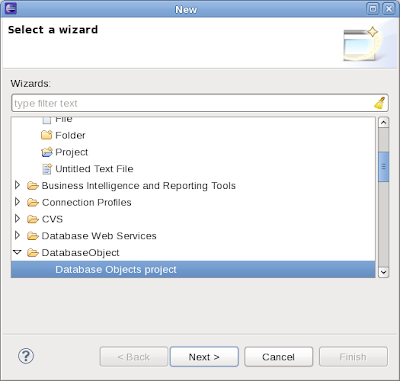
New project wizard
Having project nature defined I created New Wizard Project action. It creates Database Objects project and applied project nature to it.
Wizard class - available here.
Project properties
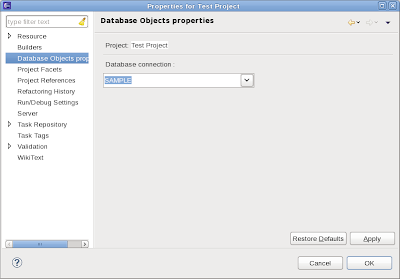
Next step is to add some specific properties to the project (identified by project nature).
Supporting class is defined here. This property is very simple and allows assign DB2 database connection (look above) to the project.
Integration with Eclipse Data Tools Platform
Every Java developer knows very well how to set up JDBC connection to any database (jar files, driver, URL etc). But Eclipse plugin developer does not need reinvent this wheel again, it is done already. The only effort is to make usage of goodies provided by Data Tools Platform.
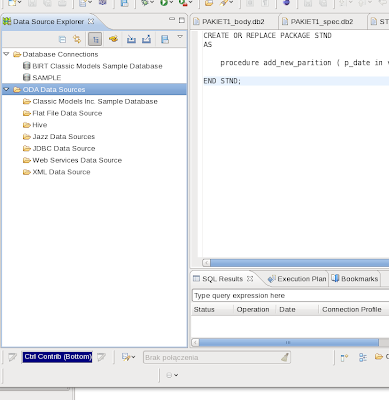
Unfortunately - integration with Data Tools Platform is not easy task and requires tedious browsing through doc and sample. But after being connected we can run SQL statements by using standard JDBC methods and tools.
Several useful pieces of code can be found here.
Extract existing PL/SQL packages from DB2 database
First step to work with PL/SQL packages is to extract them from DB2 database into our Database Object project.
Enumerating and retrieving PL/SQL packages is performed by several DB2 specific SQL statements.
Source code

After double clicking on any PL/SQL package name the content of this package is displayed.

Project with some PL/SQL packages extracted
After extracting required packages our project contains package specification and body as a plain text file and by using Eclipse text editor it is possible to modify and develop them.

Deploying PL/SQL packages into DB2 database
Of course - also opposite operation is possible. After modifying package content we can put it again into DB2.

Deploying package into DB2 is done by standard JDBC Statement.execute method. Source code :
Conclusion, future.
Of course, this plugin is rather a skeleton and is unlikely to be used in any production environment. But can be used as a starting point for future development.
I created my next Eclipse plugin. Full source code is available here. This time a little bit more complicated one. It allows extracting and working with PL/SQL packages (specification and body) and deploy them again. It is not a mistake - PL/SQL (SQL Oracle dialect) packages can be created and run against DB2 by virtue of Oracle Compatible Mode in DB2.
Of course - it is rather a lightweight version.
My purpose was also to practice some additional features of Eclipse plugin I have not used so far: project nature, new project wizard, project properties, and integration with Data Tools Platform component.
Project nature
Eclipse project nature does not mean anything special. It allows to distinguish one project from another and to define some actions or properties specific to some project. For instance : "Extract PL/SQL objects" actions (look below) makes sense for a project with nature "Database Object" only but does not make any sense for any other project.
Defining project nature is very simple. Just add an entry in plugin.xml file.
<extension
         id="databaseobject.category.projectNatureId"
         point="org.eclipse.core.resources.natures">
      <runtime>
         <run
               class="databaseobject.nature.ProjectNature">
         </run>
      </runtime>
</extension>
and supporting class (with empty content in this case).
New project wizard
Having project nature defined I created New Wizard Project action. It creates Database Objects project and applied project nature to it.
 <extension
         id="databaseobject.category.wizards"
         name="Custom Wizard"
         point="org.eclipse.ui.newWizards">
         <category
            id="databaseobject.category.wizards"
            name="DatabaseObject">
      </category>
        <wizard
            category="databaseobject.category.wizards"
            class="databaseobject.wizards.NewProjectWizard"
            id="databseobject.wizard.new.custom"
            name="Database Objects project">
      </wizard>
      </extension>
Wizard class - available here.
Project properties
Next step is to add some specific properties to the project (identified by project nature).
<extension
      point="org.eclipse.ui.propertyPages">
   <page
         class="databaseobject.properties.DatabaseObjectPropertyPage"
         id="databaseobject.properties.DatabaseObjectPropertyPage"
         name="Database Objects properties">
  <filter name="nature"
     value="databaseobject.category.projectNatureId"/>
   </page>
</extension>
By means of project nature this property will be visible only for this type of project and absent in all other projects.Supporting class is defined here. This property is very simple and allows assign DB2 database connection (look above) to the project.
Integration with Eclipse Data Tools Platform
Every Java developer knows very well how to set up JDBC connection to any database (jar files, driver, URL etc). But Eclipse plugin developer does not need reinvent this wheel again, it is done already. The only effort is to make usage of goodies provided by Data Tools Platform.
Unfortunately - integration with Data Tools Platform is not easy task and requires tedious browsing through doc and sample. But after being connected we can run SQL statements by using standard JDBC methods and tools.
Several useful pieces of code can be found here.
Extract existing PL/SQL packages from DB2 database
First step to work with PL/SQL packages is to extract them from DB2 database into our Database Object project.
Enumerating and retrieving PL/SQL packages is performed by several DB2 specific SQL statements.
Source code
     /** Statement enumerating all PL/SQL packages. */
        private static final String SELECTPACKAGESTATEMEN = "SELECT MODULESCHEMA, MODULENAME FROM SYSCAT.MODULES WHERE MODULETYPE = 'P' ORDER BY MODULESCHEMA"; //$NON-NLS-1$
        /** Statement retrieving package specification. */
        private static final String SELECTPACKAGESPEC = "SELECT TEXT FROM DBA_SOURCE WHERE SCHEMA = ? AND TYPE = 'PACKAGE' AND NAME = ?"; //$NON-NLS-1$
        /** Statement retrieving package body. */
        private static final String SELECTPACKAGEBODY = "SELECT TEXT FROM DBA_SOURCE WHERE SCHEMA = ? AND TYPE = 'PACKAGE BODY' AND NAME = ?"; //$NON-NLS-1$
To display and select which packages are to be extracted I reused Feature Tree created in my previous Eclipse project.After double clicking on any PL/SQL package name the content of this package is displayed.
Project with some PL/SQL packages extracted
After extracting required packages our project contains package specification and body as a plain text file and by using Eclipse text editor it is possible to modify and develop them.
Deploying PL/SQL packages into DB2 database
Of course - also opposite operation is possible. After modifying package content we can put it again into DB2.
Deploying package into DB2 is done by standard JDBC Statement.execute method. Source code :
// get jdbc connection
                        Connection jdbc = PluginUtil.getConnection(iP);
                        // read and prepare script as string
                        String fileName = PluginUtil.getFileName(sel);
                        FileReader r = new FileReader(new File(fileName));
                        String sql = "";
                        int ch;
                        while ((ch = r.read()) != -1) {
                                sql += (char) ch;
                        }

                        // run sql statement (deploy PL/SQL package here)
                        Statement stmt = jdbc.createStatement();
                        stmt.execute(sql);
Nothing specific is necessary to accomplish it.
Conclusion, future.
Of course, this plugin is rather a skeleton and is unlikely to be used in any production environment. But can be used as a starting point for future development.
- Add "New package" action. Creates empty package specification and body
- Deploy action also available from editor
- Deploy group of packages at the same time
- "Run" action. Allows defining and executing SQL statement which calls some package method for testing purpose.
- Better integration with Data Tools Platform, use SQL editor available there. Unfortunately Data Tools Platform package is not enabled for PL/SQL packages in DB2 and it is not possible to deploy them.
- Make usage of "SQL Results" view provided with Data Tools Platform for keeping tracks of all database activities (extracting and deploying).
IBM Data Studio
One can ask if it makes any sense to develop this skeleton if IBM Data Sudio is available for free and contains all that functionality and much more. IBM Data Studio is a very good choice but I found some problems there.
- It is not possible to deploy package specification only (without package body).
- Package content is persisted as XML document and there is no easy method to extract it into plain text file (only by copy and paste).
- Because of that also Eclipse "Compare" text does not work as expected (compares XML files).
But on the other hand IBM Data Studio is still evolving tool (version 3.1 was released on November 2011) and may be the next version will contain a solution to the problems described above.
Subskrybuj:
Posty (Atom)