Blog do projektu Open Source JavaHotel

czwartek, 24 kwietnia 2014

Java Hotel, new version, printing and pdf generating

Introduction
I deployed new version of JavaHotel application to Google App Engine infrastructure. The version is available here and source code for all application is available here (U/P user/user). This version contains PDF generating for bill issued and receipt printing (from PDF). It is also possible to save PDF created and reprint it later.
PDF generating
After issuing a bill there is a "print" button in the bill list. After clicking the button a html preview of the receipt is presented (it is very rough now, requires more elaboration for real use).
The user can download the PDF (after clicking the receipt.pdf link) and print and save PDF with description for later reuse
The PDF is generated from the HTML view.

If PDF is saved then it is available for later reuse. More the one PDF can be saved for a single bill (for instance in case of correcting) to keep all documents given to the customer.

The user can download and print again the PDF and edit the description.
How it is done
The receipt (as HTML) is generated through XSLT transformation. An example used here is available here. It is very convenient and allows to align receipt form without modifying the application. It is also possible (will be implemented later) to use more then one receipt format for different customers and services.
PDF is generated from HTML by means of iText software.
XSLT and Google App Engine
After deploying the application to Google App Engine I spent some time fighting with (in Development Mode worked correctly):
transformer = tFactory.newTransformer(StreamSource(iS.openStream())) at com.sun.org.apache.xalan.internal.xsltc.trax.TemplatesImpl.defineTransletClasses(TemplatesImpl.java:352) at com.sun.org.apache.xalan.internal.xsltc.trax.TemplatesImpl.getTransletInstance(TemplatesImpl.java:366) at com.sun.org.apache.xalan.internal.xsltc.trax.TemplatesImpl.newTransformer(TemplatesImpl.java:399) at com.sun.org.apache.xalan.internal.xsltc.trax.TransformerFactoryImpl.newTransformer(TransformerFactoryImpl.java:634) at sun.reflect.NativeMethodAccessorImpl.invoke0(Native Method) at sun.reflect.NativeMethodAccessorImpl.invoke(NativeMethodAccessorImpl.java:57) at sun.reflect.DelegatingMethodAccessorImpl.invoke(DelegatingMethodAccessorImpl.java:43) at java.lang.reflect.Method.invoke(Method.java:45) javax.xml.transform.TransformerConfigurationException: javax.xml.transform.TransformerConfigurationException: Translet class loaded, but unable to create translet instance.
After applying the solution described here (deploy all jars related to xalan) the problem was resolved.
Glassfish 4.0 and GWT 2.6
I spent also some time working with problem related to Glassfish 4.0 (the same for WildFly-JBoss) and GWT 2.6
Severe: Exception while loading the app : CDI deployment failure:WELD-001408 Unsatisfied dependencies for type [Set] with qualifiers [@Default] at injection point [[BackedAnnotatedParameter] Parameter 1 of [BackedAnnotatedConstructor] @Inject com.google.gwt.thirdparty.guava.common.util.concurrent.ServiceManager(Set)] org.jboss.weld.exceptions.DeploymentException: WELD-001408 Unsatisfied dependencies for type [Set] with qualifiers [@Default] at injection point [[BackedAnnotatedParameter] Parameter 1 of [BackedAnnotatedConstructor] @Inject com.google.gwt.thirdparty.guava.common.util.concurrent.ServiceManager(Set)] at org.jboss.weld.bootstrap.Validator.validateInjectionPointForDeploymentProblems(Validator.java:403) at org.jboss.weld.bootstrap.Validator.validateInjectionPoint(Validator.java:325) at org.jboss.weld.bootstrap.Validator.validateGeneralBean(Validator.java:177)
The problem is related to Guava rather but because the Guava seems to be included in gwt-servlet.jar so the problem was inherited accordingly. I'm using also Guava but before 2.6 I utilized Guava embedded in Glassfish.
The hot discussion around this issue is available here.
The problem disappeared after applying the solution described there.

  1. Prepare beans.xml file:
  2. <beans bean-discovery-mode="none" xmlns:xsi="http://www.w3.org/2001/XMLSchema-instance" xmlns="http://xmlns.jcp.org/xml/ns/javaee"></beans>
  3. Unpack standard gwt-servlet.jar 
  4. Put this file into META-INF directory 
  5. Pack gwt-servler.jar and use it instead of original one.

poniedziałek, 14 kwietnia 2014

Byliśmy na operze

15 marca 2014 roku byliśmy na "Rinaldo" Jerzego Fryderyka Haendla w Warszawskiej Operze Kameralnej, podobało nam się bardzo.
Haendel napisał "Rinaldo" w ciągu 2 tygodni, takie tempo było możliwe dzięki temu, że około 15 numerów zostało przepisanych z wcześniejszych oper włoskich Haendla, z "Almiry", "La Resurezziane", "Agryppiny" i innych. Słynna aria "Lascia ch’io pianga" jest przejęta w całości z "Agryppiny". Haendel nie był już zupełnie nieznany w Londynie, ale to przygotowane w pośpiechu dzieło okazało się największym sukcesem sezonu, grane było przez 15 wieczorów i za życia Handla osiągnęło rekordową liczbę 53 przedstawień. Ten tryumf wyznaczył kierunek kariery Haendla w Anglii, od tego momentu na wiele dziesięcioleci "Haendel" i "opera" stały się w Londynie synonimami.
Samo libretto jest luźno oparte na "Jerozolimie wyzwolonej" Torquato Tasso, wątek historyczny został  wzbogacony o wątki baśniowe i fantastyczne. Dzięki tym wzbogaceniom londyński realizator mógł zaprezentować wszelkie możliwości teatralnej maszynerii : grzmoty, fajerwerki, smoki ziejące ogniem, maszkarony, które się pojawiają i znikają itp. Krytycy wybrzydzali na tanie efekciarstwo, ale publiczność waliła drzwiami i oknami.
Ale oczywiście, nie "efekty specjalne" zdecydowały o popularności opery, ale przede wszystkim niezwykła i zapadająca w pamięć muzyka.
Paradoksalnie, ale przedstawienie w Warszawskiej Operze Kameralnej jest zapewne najbardziej zbliżone do swojego pierwowzoru. Aczkolwiek współczesny realizator ma do dyspozycji dużo bardziej zaawansowaną technikę niż londyński z 1711 roku, to ze względu na ograniczenia sceny musi sięgać do najprostszych. Almirena znika w czeluściach zapadni, Rinaldo wypływa łódeczką na morze z szeleszczących tkanin, końcowa bitwa rozgrywa się pod czerwonym płótnem w blasku stroboskopowych świateł. W innym kontekście może by raziło, ale tutaj ta teatralna sztuczność dodaje przedstawieniu ogromnego uroku.
"Rinaldo" jest obecny w repertuarze Warszawskiej Opery Kameralnej od kilkunastu lat, przedstawienie jest perfekcyjnie dopracowane i wykonane we wszystkich szczegółach. W głównych rolach występują znane i lubiane gwiazdy tej sceny z Olgą Pasiecznik - Almireną i Anną Radziejowską w tytułowej roli. Znakomitą parę tworzyli Andrzej Klimczok jako Argante i Marta Boberska jako czarownica Armida.

niedziela, 30 marca 2014

octave, Mel-frequency cepstrum

Introduction
I created Octave version of Mel-frequency spectrum implementation. I followed approach from this article. Source is available here. In order to run this code two additional packages should be installed : nan and signal.
General description
The implementation is controlled by several global variables.
  • NOMELS: the size of MEL filterbank
  • STARTHZ : lower frequency
  • LASTHZ : upper frequency (usually half of the sample frequency).
  • FFTSIZE : FFT resolution (usually 512 or 1024)
There are several functions defined.
  • readsound1 : read wav file (only one channel if more defined)
  • applyhunning : apply window Hunning function
  • countmel : convert Hertz value to Mel scale
  • revmel : inverse to countmel
  • calcpoints: calculate NOMELS mel scale points from STARTHZ to LASTHZ
  • calfreq : trasforms calcpoints to Hertz 
  • calcbins : transforms calfreq to FFT bins equvalence 
  • melbins : calcpoints -> calfreq ->calcbins
  • creatembank : create mel filterbank for single mel filter
  • createfilters : create the whole filter bank (a vector of single filter)
  • calculateenergy : create mel coefficient (energy sum) for FFT output
  • transformenergy : calculateenergy->log->dct
  • transformmel : create mel coefficients for input signal
Usage
I tried to use this package for recognizing numbers in voice command but failed. As a reference voice I downloaded samples from http://dictionary.reference.com/ (for instance for one). As an input voice recording I tried automatically generated voices from text-to-speech demo and some natural voices.
The matching function is defined as matchsinglefile. It simply scans through input signal (using global variables SLICESIZE and OFFSET) and cuts off consecutive slices. Then compares mel coefficients for this slices against mel coefficient of reference sound using rms (Euclide distance) function. 
 But I failed to find a treshold allowing to tell number from non-number. Probably all stuff requires more elaboration.


środa, 12 marca 2014

InfoSphere Sreams and Oracle

Introduction
InfoSphere Streams can connect to Oracle database also. InfoSphere Streams installation contains Database Toolkit which provides several operators which allow integration with external databases (including Oracle). The functionality is very limited (it is nothing more then insert/update and select) but it is enough for typical InfoSphere Stream application.
Oracle and unixODBC
First thing to do is to download, install and setup unixODBC connection with Oracle database.
Oracle client
Download and install Oracle client software.  At least two products should be installed: Basic and ODBC. Also SQL*Plus is recommended for testing and administering.
unixODBC connection
Set LD_LIBRARY_PATH environment variable pointing to Instant Client installation.
Example
export LD_LIBRARY_PATH=$LD_LIBRARY_PATH:/usr/local/instantclient_12_1/
Make sure that libsqora.so.12.1 library has all dependency resolved.
[sb@host ~]$ ldd /usr/local/instantclient_12_1/libsqora.so.12.1 
 linux-vdso.so.1 =>  (0x00007ffff43ff000)
 libdl.so.2 => /lib64/libdl.so.2 (0x00007ff65554a000)
 libm.so.6 => /lib64/libm.so.6 (0x00007ff6552c5000)
 libpthread.so.0 => /lib64/libpthread.so.0 (0x00007ff6550a8000)
 libnsl.so.1 => /lib64/libnsl.so.1 (0x00007ff654e8f000)
 librt.so.1 => /lib64/librt.so.1 (0x00007ff654c86000)
 libclntsh.so.12.1 => /usr/local/instantclient_12_1/libclntsh.so.12.1 (0x00007ff651f99000)
 libodbcinst.so.2 => /usr/lib64/libodbcinst.so.2 (0x00007ff651d88000)
 libc.so.6 => /lib64/libc.so.6 (0x00007ff6519f3000)
 /lib64/ld-linux-x86-64.so.2 (0x0000003732c00000)
 libnnz12.so => /usr/local/instantclient_12_1/libnnz12.so (0x00007ff6512dd000)
 libons.so => /usr/local/instantclient_12_1/libons.so (0x00007ff651099000)
 libaio.so.1 => /lib64/libaio.so.1 (0x00007ff650e97000)
 libclntshcore.so.12.1 => /usr/local/instantclient_12_1/libclntshcore.so.12.1 (0x00007ff650947000)
 libltdl.so.7 => /usr/lib64/libltdl.so.7 (0x00007ff65073e000)
[sb@host ~]$ 
Create /etc/tnsnames.ora connection  file 
(example)
[sb@host ~]$ cat /etc/tnsnames.ora 
testdb=
 ( DESCRIPTION =
  (ADDRESS_LIST =
  (ADDRESS =
  (PROTOCOL = TCP)
  (Host = think)
  (Port = 1521)
  )
 )
 (CONNECT_DATA = (SID = testdb)
 )
)
Make sure that connection by sqlplus is working
[sb@host ~]$ sqlplus testuser/testuser@testdb

SQL*Plus: Release 12.1.0.1.0 Production on Wed Mar 12 23:06:24 2014

Copyright (c) 1982, 2013, Oracle.  All rights reserved.

Connected to:
Oracle Database 11g Enterprise Edition Release 11.2.0.1.0 - Production
With the Partitioning, OLAP, Data Mining and Real Application Testing options
Modify (or create) /etc/odbcinst and /etc/odbc.ini configuration files
[sb@host ~]$ cat /etc/odbcinst.ini
[ORACLE]
Description = Oracle
Driver   = /usr/local/instantclient_12_1/libsqora.so.12.1
[sb@host ~]$ cat /etc/odbc.ini
[testdb]
Description  = Oracle
Driver   = ORACLE
ServerName  = testdb
UserID   = testuser
Password = testuser
Verify that isql utility is working with Oracle
[sb@host ~]$ isql testdb
+---------------------------------------+
| Connected!                            |
|                                       |
| sql-statement                         |
| help [tablename]                      |
| quit                                  |
|                                       |
+---------------------------------------+
SQL> 
create table testid (id integer, name varchar(100))
InfoSphere Streams application
A simple StreamsStudio project is available here.
Database Toolkit operators use connection.xml file which specifies how application connects with external database. Connection.xml file contains information about connection and tables used in the database by InfoSphere Streams application.
Example of connection.xml file is available here.
Next step is to create application itself. It is very easy if one uses StreamsStudio framework, just drag operators to the application graph and connects input and output ports.
An example of sample application adding stream of data to external Oracle database is available here.
Visualization of this application:
Important limitation related to Oracle
Oracle does not support SPL int64 and uint64 data type. Also BIGINT in connection.xml file cannot containt BIGINT type (use INTEGER instead).

poniedziałek, 3 marca 2014

Jython MVP, enhancement

Introduction
I added several enhancement to MVP Jython framework. The source code is available here. The sample application (Google App Engine) is available here.
Show, hide, enable and disable buttons
The description is available here.
Custom button in list tool bar and image button

Description is available here.
Blobs, download and upload
All blob content (files) are stored in a single table. It is possible to upload and download content via UI and also API for blob handling is available directly. More information is available here.
PDF
I want also add a PDF creation. But it is not easy to find a package which works in Google App Engine. The iText looks promising. It can be reached from Jython directly - look sample.
from com.itextpdf.text import DocumentException
from com.itextpdf.text import Paragraph
from com.itextpdf.text.pdf import PdfWriter

def createPDF(var) :
  
    # step 1
    document = Document()
    b = ByteArrayOutputStream()
    # step 2
    PdfWriter.getInstance(document, b)
    # step 3
    document.open()
    # step 4
    document.add(Paragraph("Hello World!"))
    #step 5
    document.close()
    return b.toByteArray()
Practical test in Google App Engine environment: http://jythonui.appspot.com/?start=startleft.xml  -> Different lists -> Dialog with attachments -> Upload -> PDF

piątek, 28 lutego 2014

Byliśmy na przedstawieniu

6 marca 2014 roku byliśmy na przedstawieniu "Wiśniowego sadu" Czechowa w Teatrze Studio Spektakl bardzo udany, ale nie powalał na kolana.

Dla potrzeb przedstawienia zostało zrobione nowe tłumaczenie, słyszymy współczesny język pozbawiony archaizmów. Na scenie nie widzimy także eleganckich ziemian przechadzających się w wytwornych wnętrzach. Także huczna zabawa na końcu przypomina dzisiejsze imprezowanie, a nie bal w dworskich pokojach. Rosyjskie realia z końca XIX wieku pojawiają się głównie w wypowiedziach Łopachina, dawnego chłopa pańszczyźnianego, który dzięki uwłaszczeniu jest pełnoprawnym gościem na pokojach, gdzie kiedyś wstęp dla takich jak on był nie do pomyślenia.
Z drugiej strony realizatorzy nie wtłaczają sztuki w jakiś współczesny kontekst, np. że Raniewscy to podupadający inteligenci, nie potrafiący zrozumieć, że ogłada, kultura i wykształcenie nic nie znaczą w konfrontacji z siłą pieniądza.

Ale to także jest słabością przedstawienia, które podobnie jak bohaterowie sztuki, jest zawieszone między starym i nowym. Główny zarzut jaki można postawić, że po prostu nie wzrusza, ani nie porusza. Najjaskrawiej wyraża to Trochinow. Wygłasza rewolucyjne kwestie, który mogłyby być zapowiedzią czasów, gdy nie tylko wiśniowy sad ale i cały świat którego częścią są Raniewscy zostanie wycięty, ale dla współczesnych widzów to staroświecka retoryka z epoki, która przeminęła 25 lat temu.

Sama fabuła sztuki jest przecież nieskomplikowana, jak ktoś słusznie zauważył, można ją streścić jako: "wiśniowy sad ma być sprzedany, wiśniowy sad jest właśnie sprzedawany, wiśniowy sad został sprzedany !". W tę banalną fabułę mamy wplecionych banalnych ludzi, ale poruszających kwestie dotyczące nas wszystkich. O sens i cel życia, jak zatrzymać uciekający czas ale jednocześnie podążać za nowymi czasami, jak być tam, gdzie jest nasze serce i wspomnienia a jednocześnie wyrwać się do wielkiego świata. Bohaterowie sztuki są szczęśliwi i jednocześnie nieszczęśliwi, cały czas czegoś szukają i na coś czekają, ale niczego nie znajdują i nic nie przychodzi.

Ale w przedstawieniu w Teatrze Studio tego nie widzimy ani nie słyszymy. Centralną postacią Raniewska, wzniosła i banalna, z jednej strony utracjuszka która zmarnotrawiła majątek rodzinny na wystawne życie w Paryża, z drugiej strony kobieta szukająca miłości i fatalnie lokująca swoje uczucia w mężczyznach, którzy na to nie zasługują. Wszystko się obraca wokół niej, osoby z otoczenia wiedzą o jej wadach, ale jednocześnie kochają ją. Ale w przedstawieniu widzimy tylko podstarzałą utracjuszkę używającą życia i topiącą smutki w alkoholu i przygodnych romansach.  Żadna z postaci nas nie porusza, ani nie wzbudza sympatii czy nawet antypatii, co najwyżej irytację, jak brat Raniewskiej, Gajew sprawiający wrażenie jakby cały czas był w oparach alkoholu. Jedyną jasną postacią jest Łopachin, doskonale rozumiejący, że aby wspiąć się na wyższy szczebel drabiny społecznej nie wystarczy pełny portfel czy nawet zakup majątku dawnych panów.

Osią sztuki jest odchodzący w niebyt dawny świat, ale nas to nie wzrusza, gdyż ten świat jest zupełnie pozbawiony wdzięku czy uroku, nawet jeśli tym światem było próżniacze życie arystokratów. Wielkim nieobecnym jest także tytułowy bohater, czyli sam wiśniowy sad. Wiśniowy sad jest jak "white elephant", czy artefakt bardzo efektowny i prestiżowy (wzmiankowany - jak Gajew podkreśla z dumą - nawet w Encyklopedii), ale całkowicie bezużyteczny. W przedstawieniu pojawia się tylko w słownych kwestiach i długich spojrzeniach aktorów zawieszonych w okolicy widowni. Widzom trudno więc zrozumieć, dlaczego Raniewska nawet nie chce słyszeć o wycięciu sadu i rozparcelowaniu terenu na działki rekreacyjne, chociaż jest to jedyny realistyczny plan uratowania majątku czy dlaczego mówi "jeśli ma być sprzedany sad, to ja zostanę sprzedana razem z nim". Więc i finał przedstawienia, którym jest przecież zagłada wiśniowego sadu także nie wzbudza echa.

Zaletą przedstawienia jest po prostu samo przedstawienie, czyli bardzo dobra gra aktorów, ładna inscenizacja, efektowny i dynamiczny taniec w III akcie oraz warkocz a'la Julia Tymoszenko Raniewskiej w końcowym akcie, który w świetle ostatnich wydarzeń z Ukrainy nabrał nowego znaczenia, nie przewidzianego przez reżyserkę.

środa, 8 stycznia 2014

IBM InfoSphere Streams, REST API and GWT

Introduction
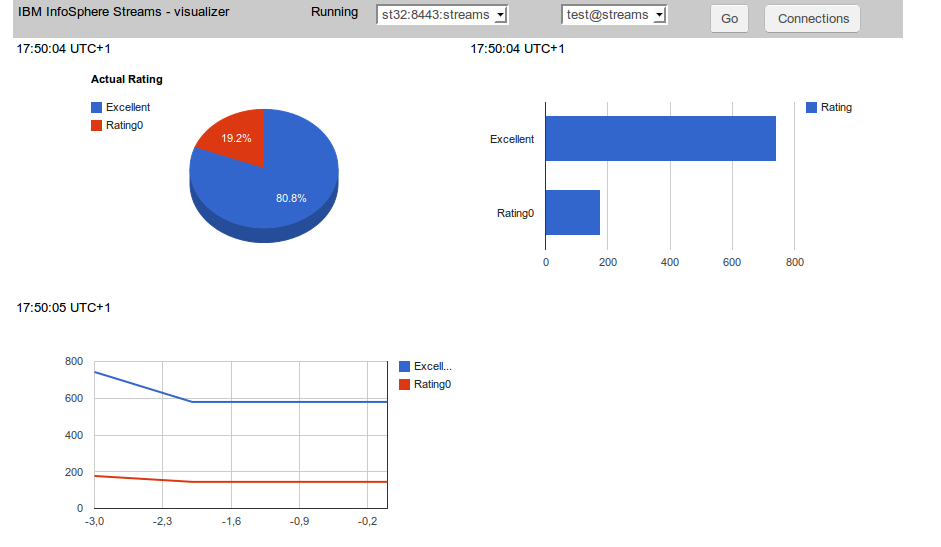
One thing is to get access to IBM InfoSphere Streams via REST API but another thing is to make use of it. So I created a simple GWT application which connects  to the Streams instance and monitors execution of SPL project (by reading operator custom metric) and displays the result as a graphic charts.

Source code for GWT application is available here. As a 'chart engine' Google Charts is used with GWT wrapping library.
Streams SPL code
It is a very simple SPL application. Source code is available here. Just generates randomly number 0 - 4 and counts all 0 as 'rating0' and all other numbers as 'excellent'.
Connections handling
Every connection is defined by host and port and authentication credentials (user and password). So a special module has been created for defining and storing a list of connections.

List is stored as a browser cookie entry. To keep connection 'database' separated an interface has been created.


/**
 *
 * @author sbartkowski
 * Container for database containing connections data
 */

public interface IDatabase {

       
        enum OP {
                ADD, REMOVE, CHANGE
        };

        // List of connections
        List getList();

        // Add, remove or change connection
        void databaseOp(OP op, ConnectionData data);

        // Test if connection exists (by host, port and user)
        boolean connectionExists(ConnectionData data);

        // Creates connection identifier host:port:user
        String toS(ConnectionData data);
       
        // Find connection by identifier
        ConnectionData findS(String s);

}

'Cookie' implementation is available here. This way it is possible to change the storing mechanism without affecting the rest of the application.
Because one host can supervise more then one instance also combo box with the list of instances is created.
Localization
All strings used in  the user interface are defined as com.google.gwt.i18n.client.Constants resource. For the time being only English version is created but no problem to add another locale resource.
Charts
Google Charts is used for this purpose together with GWT visualization interface. Three charts types are used: PieChart, BarChart and LineChart. A source code preparing and refreshing this charts is available here.
Access to Streams REST API
Because of the Same Origin Policy restriction it is not possible to make REST API call directly from GWT client application. So the call is made from the server side (Java) code and send to the client via RPC. The server side code is available here. The JSON string is sent unmodified  and then decoded at the client side using GWT JSON package.
Conclusion
After resolving some technical issues the REST API access to IBM InfoSphere Streams seems to be quite easy and straightforward. The combination of GWT, Google Charts and REST API is very powerful and this basic application can serve as a basis for developing more complex solution.